

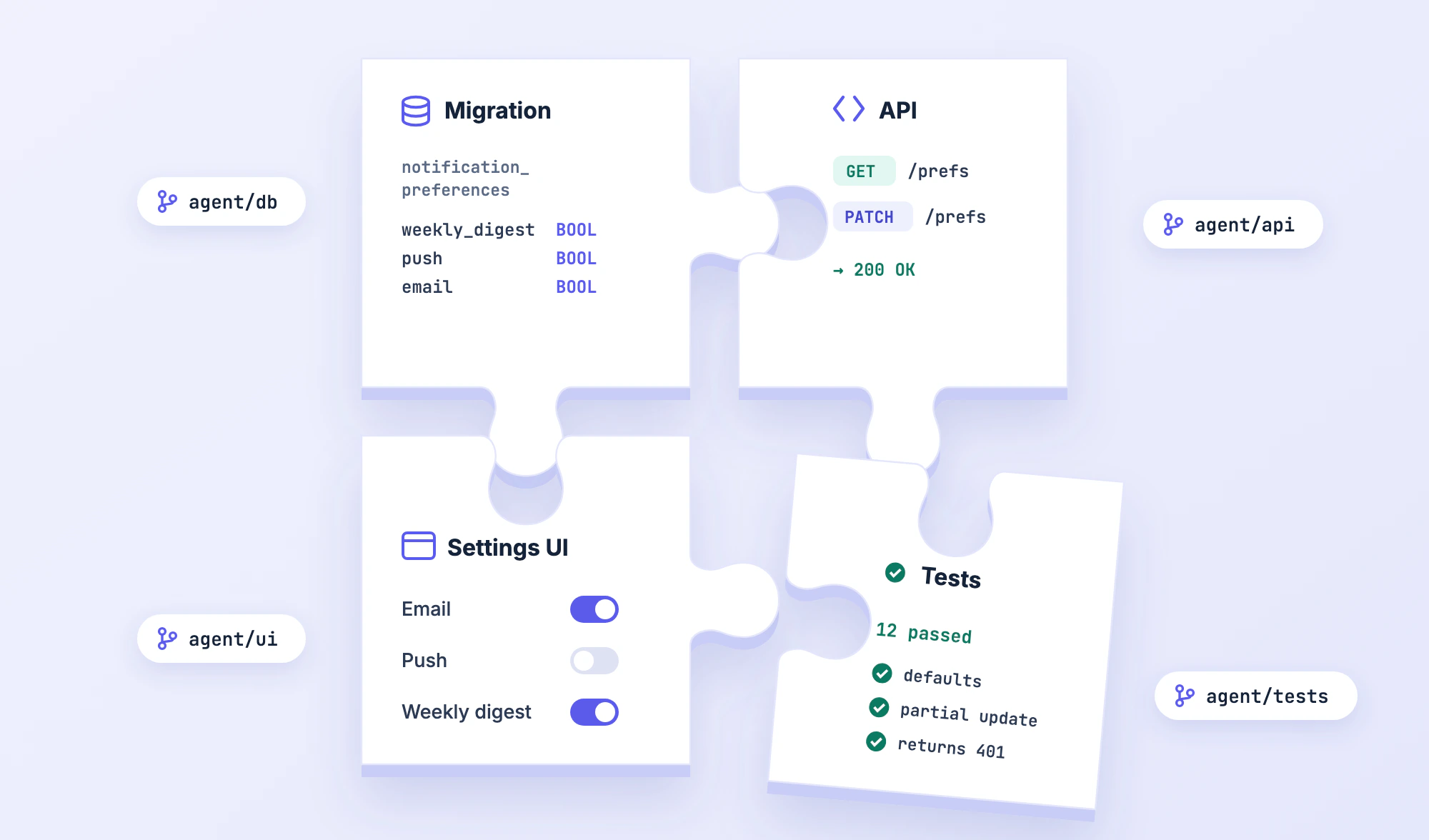
Claude Code implements an API endpoint. Codex builds the frontend. Two other agents handle the database migration and test coverage.
Four completed tasks. Four passing test suites. Zero Git conflicts.
The integrated feature breaks.
The backend returns a nullable field the frontend treats as a boolean. The frontend tests use mocked responses that conform to the original contract. Git sees no overlapping changes because the failure exists in application behavior, not the diff.
Running multiple AI coding agents on one codebase introduces familiar engineering problems: resource contention, stale state, dependency ordering, and semantic conflicts.
Git worktrees separate working directories, but they won't stop two implementations from making incompatible assumptions about a shared interface.
This guide covers how to structure parallel workstreams, isolate execution environments, coordinate different coding agents, recover from failed sessions, and integrate their output into a verified feature.
TL;DR
- Parallelize tasks based on dependencies and coupling, not agent availability.
- Assign each implementation agent a dedicated worktree and isolated runtime resources.
- Commit shared contracts before starting dependent workstreams.
- Define file ownership, acceptance criteria, and escalation rules.
- Use commit-pinned handoffs to manage context drift and recover interrupted sessions.
- Run CI against the integrated revision and measure throughput by accepted PRs.
How to Run Multiple AI Coding Agents
A reliable multi-agent coding workflow requires coordination across five layers:
| Layer | What Needs Managing |
|---|---|
| Code Isolation | Worktrees, branches, file ownership |
| Runtime Isolation | Ports, databases, containers, credentials |
| Shared Context | Interfaces, decisions, dependencies, handoffs |
| Execution Continuity | Usage limits, checkpoints, failed sessions |
| Supervision | Blockers, approvals, review, integration |
The following workflow uses a notification preferences feature in an existing TypeScript SaaS application as a running example. The repository structure, commands, and implementation details are illustrative and should be adapted to your stack.
1. Decompose Tasks Along Dependency Boundaries
Agent count is a poor starting point for task decomposition. Start with the feature's dependency graph.
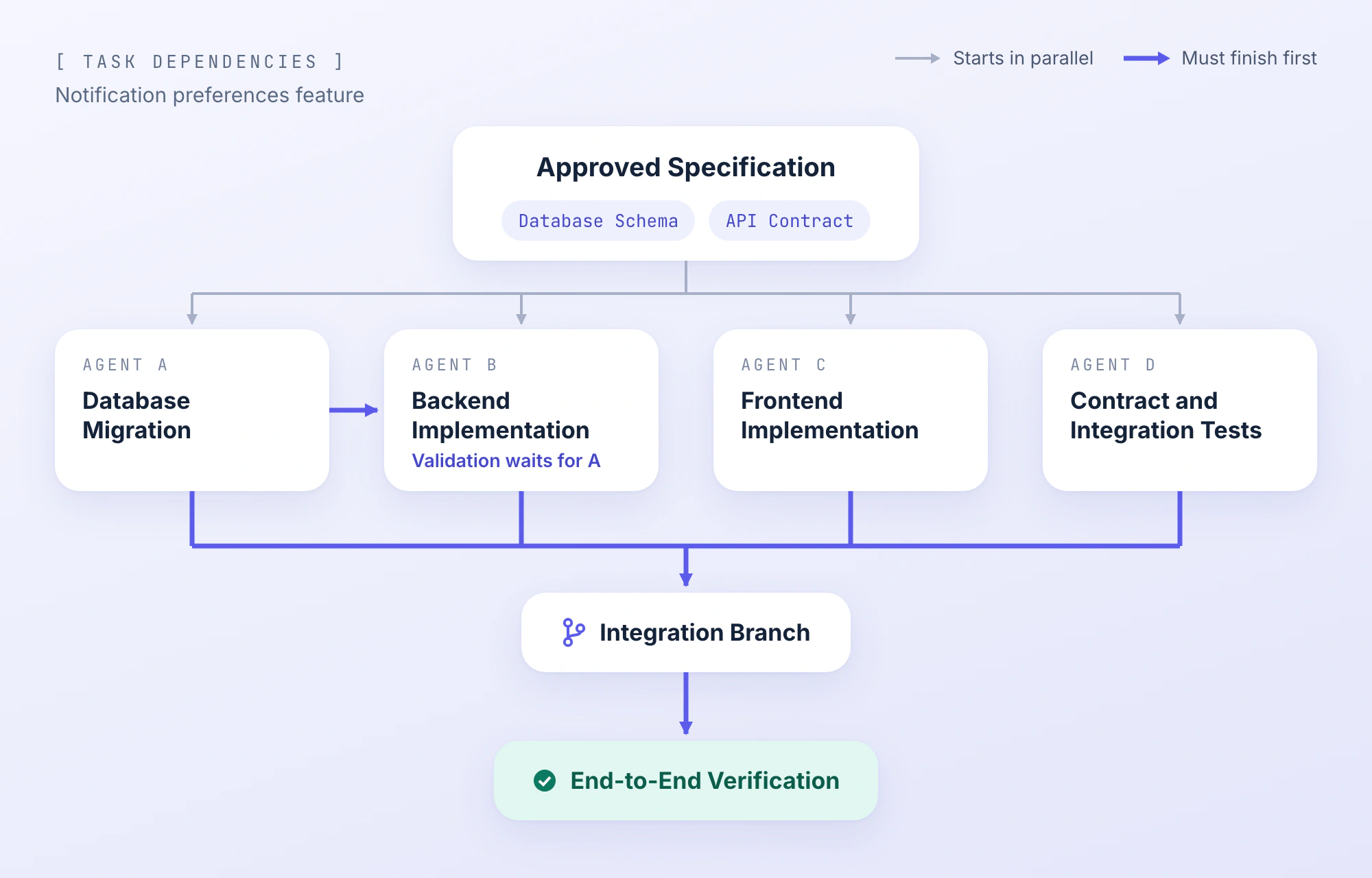
Adding notification preferences requires a database migration, backend endpoints, a frontend settings page, and test coverage.
Four agents can implement these components, provided they aren't independently defining the same schema or API behavior.
| Workstream | Responsibility | Dependencies |
|---|---|---|
| Agent A | Database migration | Approved schema |
| Agent B | GET and PATCH endpoints | Schema and API contract |
| Agent C | Frontend settings page | API contract |
| Agent D | Contract and integration tests | Acceptance criteria and API contract |
Commit the schema and API specification before starting implementation. Agents B, C, and D can then develop against those definitions while Agent A implements the migration.
Backend runtime validation still requires the actual migration. End-to-end verification requires all four workstreams.
Low-coupling tasks generally offer the best parallelization opportunities. Independent bug fixes, isolated modules, UI components, and documentation are good candidates.
Changes to shared authentication middleware, package dependencies, database schemas, or core abstractions require stricter sequencing.
If two agents need to make decisions about the same interface, resolve those decisions before either starts writing implementation code.
2. Give Every Agent Its Own Git Worktree
Two agents running in separate terminals against the same checkout share uncommitted filesystem state. One can read, modify, or overwrite files while the other is still working on them.
Switching branches in that directory changes the checkout for both sessions.
Git worktrees provide independent working directories backed by the same repository.
Create a feature branch from an up-to-date base:
git fetch origin
git switch -c feature/notification-preferences origin/main
Commit the approved schema and API specification to this branch. Then create four worktrees from that revision:
BASE=$(git rev-parse HEAD)

git worktree add -b agent/notifications-db \
  ../app-notifications-db "$BASE"

git worktree add -b agent/notifications-api \
  ../app-notifications-api "$BASE"

git worktree add -b agent/notifications-ui \
  ../app-notifications-ui "$BASE"

git worktree add -b agent/notifications-tests \
  ../app-notifications-tests "$BASE"
Verify the checkouts:
git worktree listEach worktree has its own working files, index, and checked-out branch. All four agents start from the same committed specification.
You can now launch Claude Code in one terminal, starting from the original repository directory:
cd ../app-notifications-api
claude
And Codex in another:
cd ../app-notifications-ui
codex
Launch the migration and testing agents in their respective worktrees.
Using different coding agents is optional. Choose them based on observed performance on your codebase, tool access, execution permissions, and available usage.
Worktrees are not security sandboxes. An agent with unrestricted filesystem access can still modify neighboring directories or shared Git references.
3. Isolate Runtime Resources
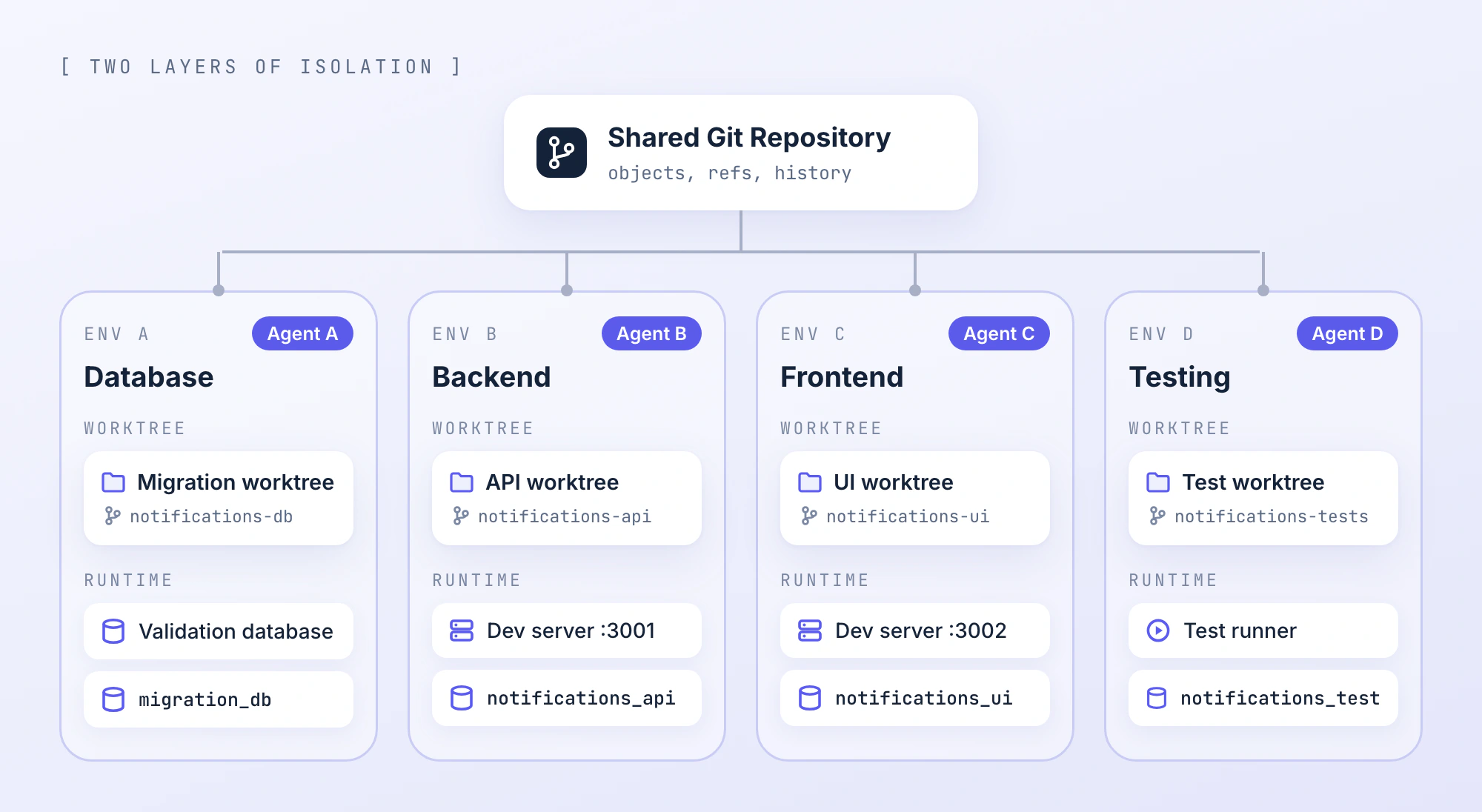
Independent checkouts don't eliminate contention over shared runtime resources.
The backend agent can start a server on port 3000 while the frontend agent attempts to bind to the same port. The testing agent can reset a database while the migration agent is validating schema changes against it.
Assign runtime resources explicitly.
| Resource | Isolation Strategy |
|---|---|
| Development Servers | Unique host ports |
| PostgreSQL | Separate databases or instances |
| Redis | Separate instances or key namespaces |
| Docker | Unique Compose project names |
| Build Artifacts | Worktree-specific output directories |
| Environment Variables | Workstream-specific configuration |
| Credentials | Scoped development permissions |
For example, the backend worktree might use:
PORT=3001
DATABASE_URL=postgresql://localhost:5432/notifications_api
REDIS_URL=redis://localhost:6381
The frontend worktree might use:
PORT=3002
DATABASE_URL=postgresql://localhost:5432/notifications_ui
REDIS_URL=redis://localhost:6382
Provision these resources before starting the agents. Environment variables configure connections; they don't create isolated infrastructure.
For containerized development environments, use distinct Compose project names:
docker compose -p notifications-api up -d

docker compose -p notifications-ui up -d
Compose namespaces many resources, but fixed host-port mappings, external networks, explicitly named containers, and shared volumes can still collide.
Fresh worktrees also need reproducible initialization. Put dependency installation, code generation, development configuration, and baseline checks into a bootstrap script rather than letting every agent reconstruct the environment.
For an npm-based repository:
npm ci
npm run generate
npm run typecheck
Use the commands already defined by your project.
Keep production credentials out of development worktrees. Filesystem separation won't protect a production database from an agent with valid write permissions.
4. Establish Shared Contracts and Ownership
Agents need an authoritative specification for the parts of the application that cross workstream boundaries.
For notification preferences, the agreed database schema might contain:
notification_preferences
  user_id        UUID PRIMARY KEY
  email          BOOLEAN NOT NULL DEFAULT TRUE
  push           BOOLEAN NOT NULL DEFAULT FALSE
  weekly_digest  BOOLEAN NOT NULL DEFAULT TRUE
The public TypeScript interface:
export interface NotificationPreferences {
  email: boolean;
  push: boolean;
  weeklyDigest: boolean;
}
The endpoint contract defines behavior beyond the data types.
| Property | Specification |
|---|---|
| Read | GET /api/notification-preferences |
| Update | PATCH /api/notification-preferences |
| Authentication | Required |
| Ownership | Current authenticated user only |
| PATCH Body | Partial preferences object with boolean values |
| Response | Complete preferences object |
| Missing Record | Return defaults; create on first valid update |
| Invalid Input | HTTP 400 |
| Unauthenticated Request | HTTP 401 |
All agents reference the same committed specification. The frontend can implement against it before the backend exists, and the testing agent can derive test cases from expected behavior rather than implementation details.
Depending on the stack, this contract could live in OpenAPI, a shared TypeScript package with runtime validation, a GraphQL schema, or Protocol Buffers.
Use a Reusable Agent Task Specification
A feature description alone leaves too much implementation scope open. Define ownership, constraints, and acceptance criteria for each workstream.
task: notifications-api
branch: agent/notifications-api

base_revision: "<base-sha>"

objective:
  Implement GET and PATCH preference endpoints.

contract:
  docs/contracts/notification-preferences.yaml

allowed_paths:
  - src/api/notifications/
  - src/services/notifications/
  - tests/unit/notifications/

read_only_paths:
  - src/auth/
  - src/shared/contracts/
  - migrations/
  - tests/integration/

constraints:
  - Preserve existing authentication middleware.
  - Do not modify the database schema.
  - Do not introduce new dependencies.
  - Escalate changes outside assigned scope.

acceptance_criteria:
  - Responses match the API contract.
  - Partial updates preserve omitted fields.
  - Invalid input returns HTTP 400.
  - Unauthenticated requests return HTTP 401.
  - Users can only access their own preferences.

handoff:
  - Commit SHA
  - Changed files
  - Verification results
  - Dependencies and unresolved issues
This is a tool-agnostic task template, not a native configuration format supported by every coding agent.
Assign similar specifications to the migration, frontend, and testing agents.
Give shared files such as lockfiles, root configuration, migration directories, and global type definitions designated owners. Where supported, enforce write boundaries through sandbox permissions rather than relying exclusively on prompt instructions.
If an agent needs to modify a shared contract, it should report the blocker and proposed change. Update the authoritative specification before affected workstreams proceed.
5. Match the Execution Pattern to the Task
Not every multi-agent workflow benefits from concurrent implementation. Select an execution pattern based on what the agents need from one another.
| Pattern | How It Works | Best For |
|---|---|---|
| Fan-Out / Fan-In | Independent tasks execute concurrently and converge during integration | Modular features, separate bug fixes |
| Sequential Handoff | One agent produces an artifact required by another | Schema changes, dependent refactors |
| Best-of-N | Multiple agents attempt the same task; one result is selected | Complex debugging, optimization, architectural experiments |
| Implementer / Reviewer | One agent implements; another independently evaluates the diff | Security-sensitive changes, complex patches |
The notification preferences feature primarily uses fan-out / fan-in, with sequential dependencies during integration.
Best-of-N serves a different purpose. Running Claude Code and Codex against the same bug in separate worktrees can produce competing implementations. Evaluate them against the same regression test and select the stronger patch.
An independent review agent is useful when implementation agents write their own tests. Give the reviewer the original requirements and final diff rather than relying exclusively on the implementation agent's summary.
These patterns can coexist within a single feature without requiring an elaborate autonomous agent hierarchy.
6. Synchronize Context Through Versioned Artifacts
A long-running agent session operates against a potentially stale view of repository state.
The migration may have changed since the backend agent started. An approved architectural decision may exist only in another session's conversation history.
Keep three types of context separate:
| Context | Source |
|---|---|
| Stable Repository Rules | Architecture documentation, AGENTS.md, CLAUDE.md, where supported |
| Current Task Requirements | Versioned specification and acceptance criteria |
| Execution State | Commits, blockers, decisions, verification results |
Conversation histories are useful for understanding how an agent arrived at a solution. They should not be the canonical source of requirements.
Use commit-pinned handoffs instead.
task: notifications-api
status: ready-for-review

base_commit: "<base-sha>"
head_commit: "<head-sha>"

verification:
  command: npm run test:notifications
  result: passed

contract_changes: none

dependencies:
  - Apply notifications-db migration.

known_limitations:
  - Push delivery is outside assigned scope.

next_action:
  - Review patch.
  - Integrate after database migration.
The next agent or reviewer can inspect the exact revision, reproduce the checks, and identify outstanding dependencies.
When a shared contract changes, pause affected workstreams, commit the revision, and synchronize their branches at a controlled checkpoint.
Don't rebase an active worktree while its agent is editing files. Stop the session's writes, preserve its work, and communicate the updated requirements before resuming.
7. Supervise Active Sessions and Recover From Failures
Once several agents are running, the developer's role shifts toward managing exceptions, dependencies, and review capacity.
You don't need to monitor every tool call. You need visibility into which sessions are progressing, which require a decision, and which have produced a reviewable patch.
A lightweight task lifecycle is sufficient:
| Status | Meaning |
|---|---|
| Ready | Requirements and dependencies are available |
| Running | Agent is executing within its assigned scope |
| Blocked | Execution requires a decision or dependency |
| Ready for Review | Changes are committed and verification results are available |
| Integrated | Changes have been accepted into the integration branch |
Set escalation conditions before execution. Agents should request intervention when they need to change a shared interface, introduce a dependency, access restricted resources, or deviate from acceptance criteria.
Recover From Failed or Stalled Agent Sessions
Long-running agents can repeat unsuccessful debugging attempts, exhaust usage allowances, or accumulate changes that no longer address the original task.
| Failure | Recovery |
|---|---|
| Repeated Debugging Loop | Stop execution, preserve logs and failing tests, reassess the hypothesis |
| Scope Creep | Inspect the diff and retain only approved changes |
| Usage Limit Reached | Preserve the checkpoint and resume with an available connection |
| Stale Repository State | Synchronize at a controlled checkpoint and refresh requirements |
| Unexpected Contract Change | Pause affected workstreams until the change is resolved |
| False Completion | Verify acceptance criteria independently before accepting the patch |
Before terminating a session, stop its writes and capture its current state:
git status --short
git diff
git diff --cached
git log -5 --oneline
Record the last successful check, current blocker, and remaining acceptance criteria. Preserve legitimate uncommitted changes, including any relevant untracked files, before handing the task to another session.
For longer tasks, use small checkpoint commits representing coherent changes. A replacement agent should be able to resume from repository state and a concise handoff without reconstructing the entire debugging history.
This is particularly useful when switching between agent harnesses or dealing with Claude Code usage limits.
8. Integrate and Verify the Combined Codebase
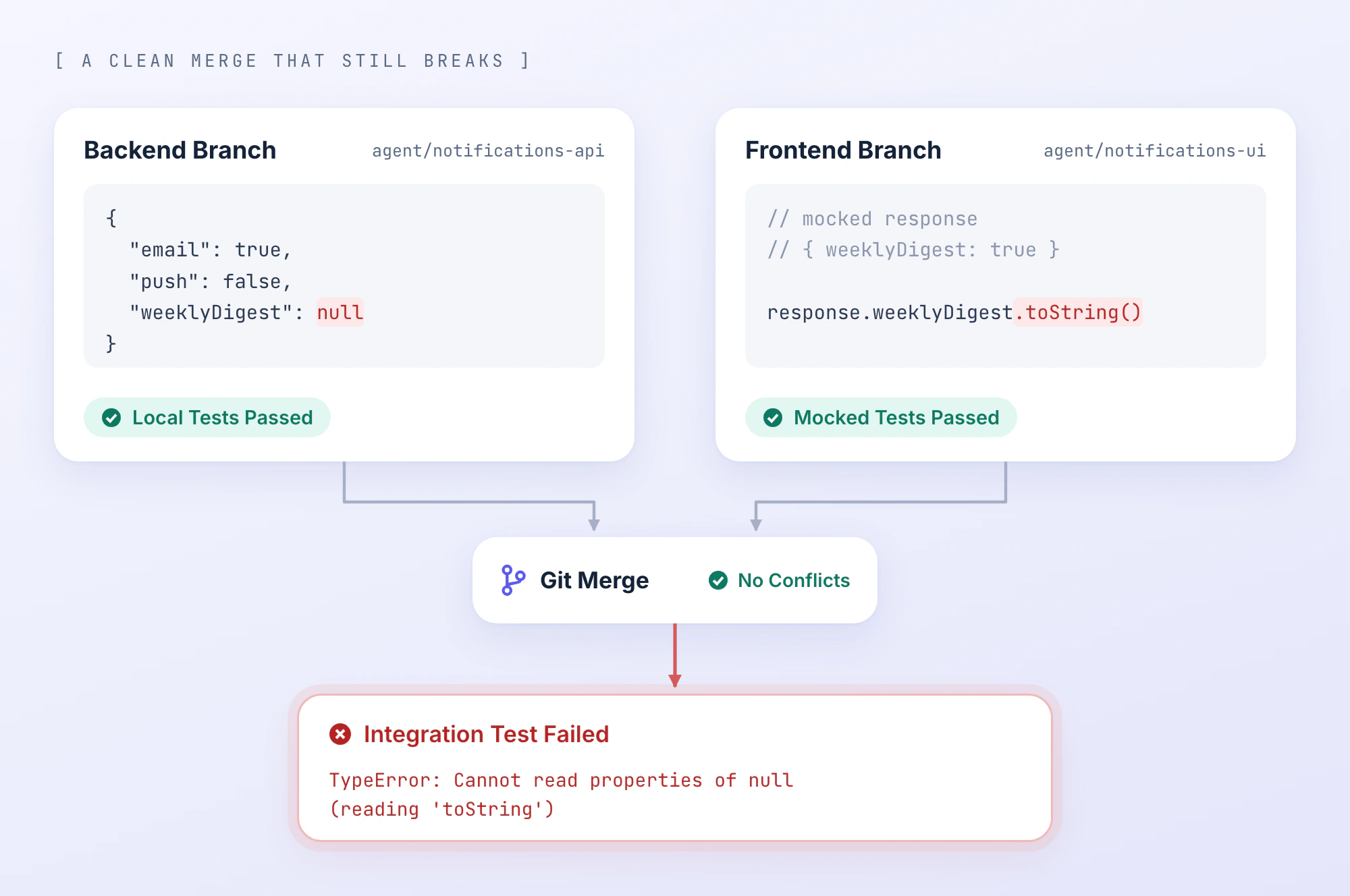
Git detects overlapping textual changes. It cannot determine whether independently developed components agree about application behavior.
Consider a backend implementation that returns:
{
  "email": true,
  "push": false,
  "weeklyDigest": null
}
This violates the agreed response contract, but the backend's local tests don't validate the field's nullability.
Meanwhile, the frontend executes:
const digestEnabled =
  response.weeklyDigest.toString() === "true";
Its mocked responses always contain a boolean, so its local tests pass.
The branches merge cleanly. At runtime, the frontend throws an exception when it receives null.
This is a semantic merge conflict. The incompatibility exists in the behavior of the combined application rather than overlapping lines of code.
Merge Changes in Dependency Order
After reviewing each agent's committed changes, create an integration branch from the shared feature base.
git switch feature/notification-preferences
git switch -c integration/notification-preferences
Integrate the migration and backend first:
git merge --no-ff agent/notifications-db
git merge --no-ff agent/notifications-api
Then integrate the frontend and testing workstreams:
git merge --no-ff agent/notifications-ui
git merge --no-ff agent/notifications-tests
If a merge produces conflicts, resolve and verify them before executing the next command.
For larger features, individual workstreams can go through separate pull requests targeting the integration branch. This keeps reviewable changes smaller while preserving a common integration target.
Run CI Against the Integrated Revision
Apply the migration to a dedicated integration database and execute the repository's verification pipeline.
For example:
npm ci
npm run typecheck
npm run lint
npm test
npm run test:integration
npm run test:e2e
npm run build
These commands represent project-defined scripts rather than a universal Node.js pipeline.
For notification preferences, the combined test suite should exercise:
- Default preferences for users without existing records.
- Partial updates that preserve omitted fields.
- Persistence across requests and page reloads.
- Invalid input and unauthenticated requests.
- Isolation between different users' preferences.
- Frontend behavior against the actual API response.
An integration test that mocks the backend response cannot detect the contract violation described above. At least part of the verification pipeline must exercise real interactions between components.
Pre-Merge Integration Checklist
- Every workstream has a reviewed, committed patch.
- Changes remain within approved scope.
- Shared interfaces satisfy the committed specification.
- Database migrations apply successfully to the relevant schema.
- Lockfile and dependency changes are compatible.
- CI passes against the integrated revision.
- Integration tests exercise real component interactions.
- Security-sensitive changes receive appropriate review.
An independent reviewer or an AI code review tool can help identify issues across the combined diff. Final acceptance should depend on the engineering requirements and verification results.
When More Coding Agents Make You Slower
Additional agents reduce delivery time only when the work they parallelize outweighs the coordination overhead they introduce.
Cursor's research into long-running autonomous coding illustrates this problem. Its experiments encountered contention in shared coordination mechanisms, inefficient task selection, and bottlenecks introduced by additional orchestration roles.
The same trade-offs apply to smaller development workflows.
A useful approximation, assuming these phases don't overlap, is:
Delivery Time = Planning + Critical Path Execution + Review + Integration + ReworkParallelism can shorten execution along the critical path. It can also increase the time spent reviewing changes, reconciling dependencies, and correcting incompatible implementations.
The practical limit is often review capacity rather than compute capacity.
If agents produce patches faster than the developer can review and integrate them, unmerged work accumulates. Branches become stale, assumptions diverge, and previously independent tasks become harder to reconcile.
Measure the workflow using engineering outcomes:
| Metric | What It Measures |
|---|---|
| Lead Time | Time from task assignment to accepted PR |
| Review Overhead | Human time spent supervising and reviewing |
| Rework Rate | Percentage of workstreams requiring substantial revision |
| First-Pass CI | Percentage of integrated changes passing verification on the first attempt |
| Cost per Accepted Task | Agent and infrastructure costs per completed task |
| Escaped Defects | Regressions discovered after integration |
Four available agents don't necessarily mean four should be writing code. Depending on the task, a better allocation might be two implementers, one reviewer, and one session available for debugging or investigation.
Managing Parallel Agents in PandaOS
The workflow above can be implemented using Git, CLI coding agents, environment scripts, and CI tooling.
As the number of active workstreams increases, managing their execution becomes a separate workload. Each session has its own branch, context, runtime state, questions, and progress.
PandaOS brings these sessions into a local AI workstation that supports different coding agent harnesses, linked worktrees, persistent project knowledge, and centralized coordination.
Separate Branches With Multi-Project
With Multi-Project, developers can run coding sessions against different branches of the same repository.
Create a Git worktree directly from a chat, associate it with a linked project, and select the worktree where the agent will operate.
PandaOS can also initialize new worktrees using approved Git-ignored files and configured setup commands, reducing the manual work required to prepare each checkout.
The application's runtime configuration still determines how databases, ports, and other resources are isolated.
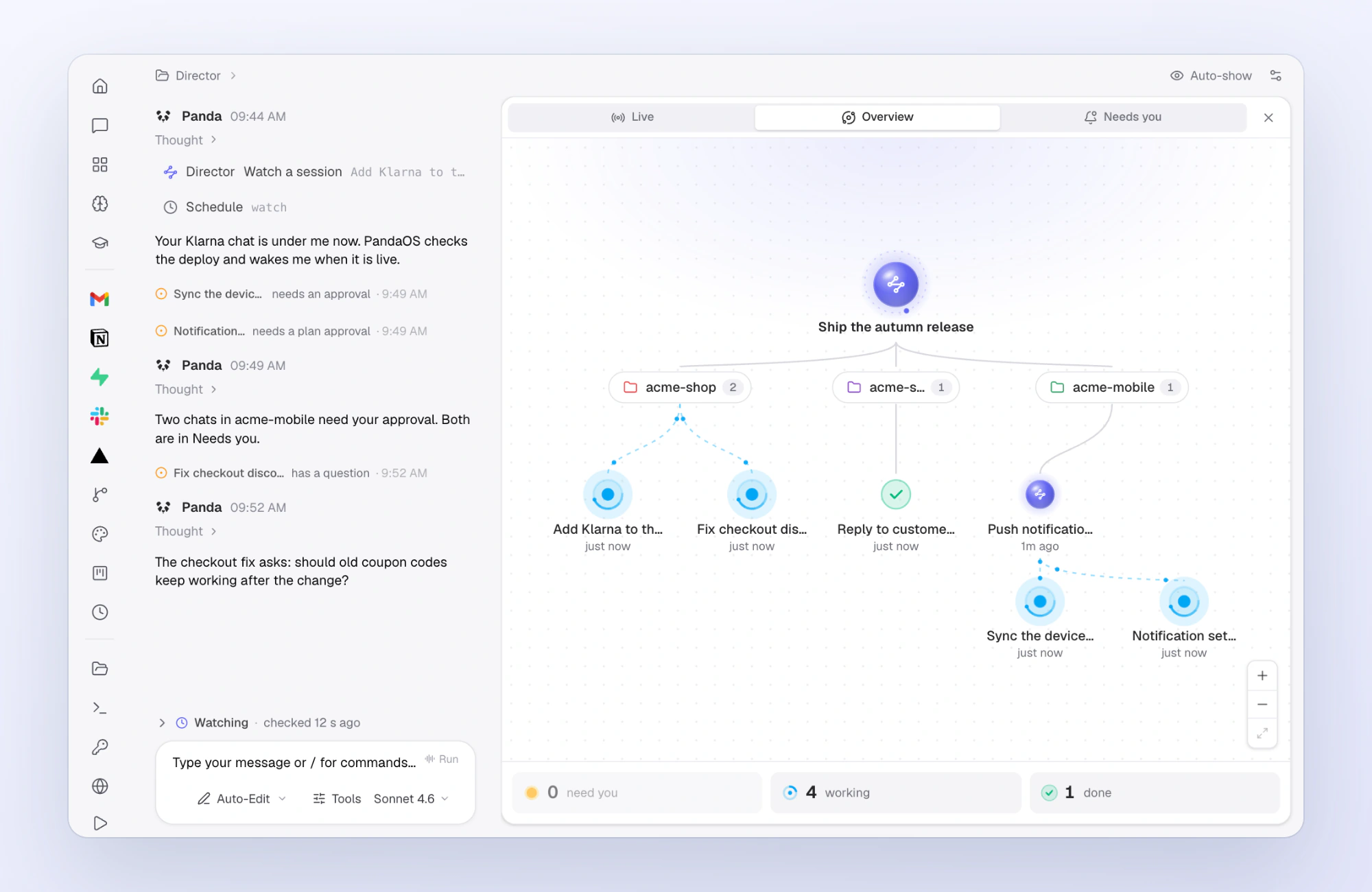
Coordinate Independent Sessions With Director
Director operates across full agent chats rather than only delegating subtasks within a parent conversation.
It can launch sessions, coordinate existing ones, surface questions, and report progress. Each chat remains independently accessible, so developers can inspect its work or intervene directly.
For the notification preferences example, the developer can maintain four separate workstreams while handling coordination from a central session.
Retrieve Project Knowledge With Atlas
Atlas captures decisions, preferences, and solved problems in a searchable knowledge base accessible across chats.
When one session identifies a repository-specific constraint or resolves an environment issue, subsequent sessions can retrieve that knowledge without requiring the developer to copy the original conversation.
Versioned contracts remain the source of truth for implementation requirements.
Maintain Execution Continuity With Hot-Swap
With Hot-Swap, developers can switch between supported coding agents and AI connections within an existing conversation, including when a configured usage threshold triggers a fallback.
A workstream can continue without reconstructing the conversation manually in a different tool.
For developers combining Claude Code, Codex, and other supported connections, PandaOS provides a common execution environment around the agents while keeping architectural decisions, Git integration, and final acceptance under developer control.
Scaling Agents Without Coordination Overhead
The limiting factor in multi-agent development is rarely how many coding sessions you can run. It's how much independently produced work you can integrate without introducing regressions, architectural inconsistencies, or an unmanageable review backlog.
Start with two agents working on loosely coupled tasks. Establish a repeatable integration process before increasing concurrency. If adding another agent generates more rework than accepted code, revisit the task boundaries rather than adding another orchestration layer.
Tools like PandaOS reduce the operational overhead of managing independent worktrees, agent sessions, project context, and execution across providers. The engineering decisions, however, remain yours.
The measure of a successful multi-agent workflow isn't how many agents are running. It's how much verified, maintainable code makes it into production.
FAQ
Can Claude Code and Codex work on the same repository?
Yes. They can operate concurrently using different worktrees and branches of the same repository. They don't require a shared agent framework or identical context windows.
Do Git worktrees duplicate the entire repository?
No. Linked worktrees share Git's underlying object database and most repository references. Each worktree still requires storage for checked-out files, installed dependencies, and generated build artifacts.
Can multiple AI agents work on the same Git branch?
Git normally prevents the same branch from being checked out in multiple linked worktrees. Agents can technically share one checkout, but concurrent writes are difficult to coordinate. Use separate task branches for independently executing implementation agents.
How do you prevent conflicting database migrations?
Assign ownership of the migration directory to one workstream. If several features require schema changes, coordinate migration identifiers, ordering, and dependencies before integration. Validate the combined migration sequence against a representative database.
How do you clean up worktrees after a feature ships?
Stop the associated sessions and confirm their changes have been integrated and no uncommitted work remains.
For example:
git worktree remove ../app-notifications-api
git branch -d agent/notifications-api
Repeat for completed workstreams. Git can reject branch deletion if it cannot establish that the changes have been merged. Verify integration explicitly, particularly after squash merges.
Use git worktree prune to clean up stale administrative records from worktrees whose directories no longer exist.