

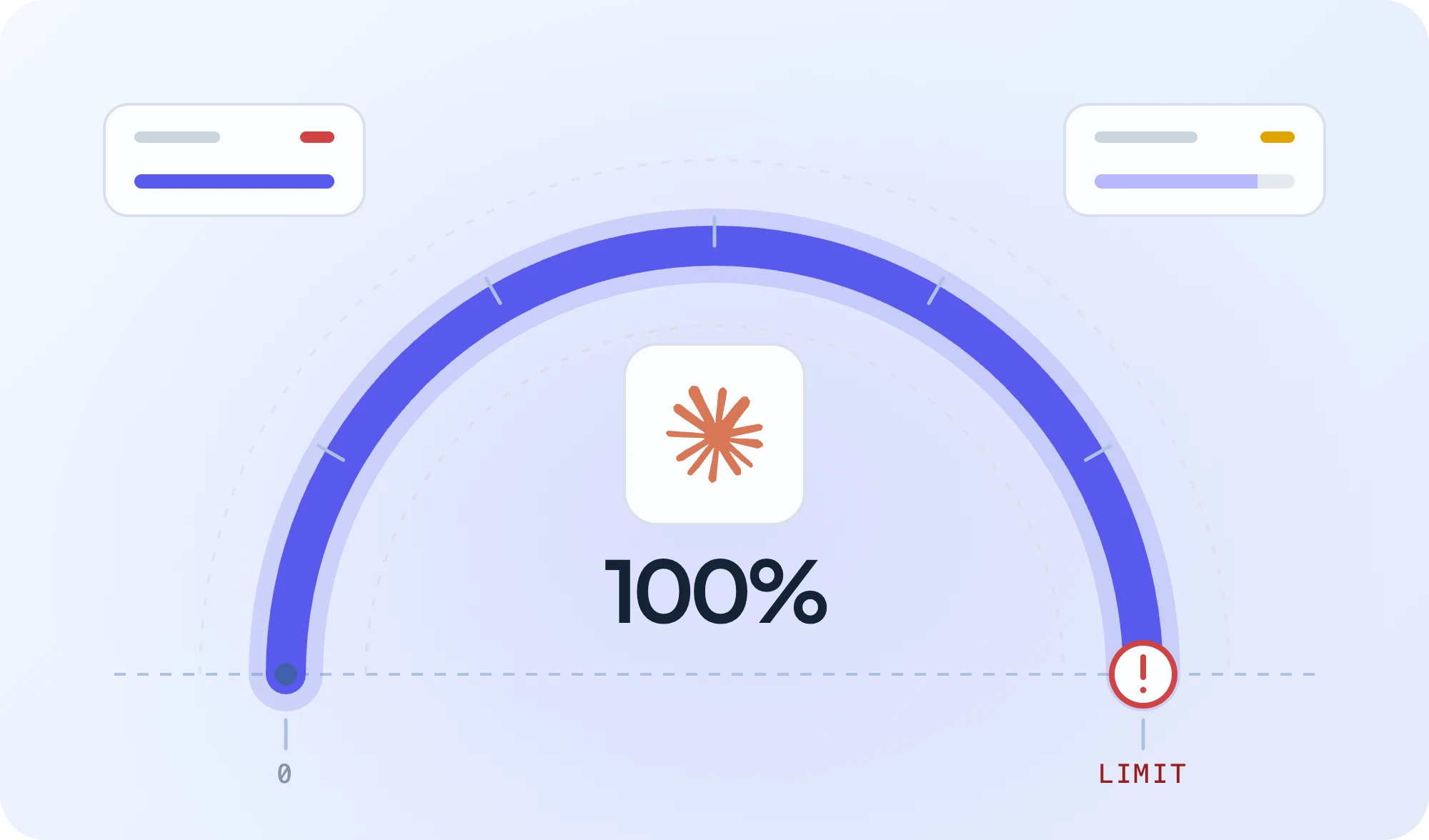
Claude Code usage limits can interrupt a coding session before you’ve finished your task. Depending on your plan, you may hit a five-hour session limit, a weekly allowance, or an additional model-specific restriction.
The five-hour limit resets five hours after your session window begins, while weekly limits reset at a fixed time assigned to your account. You can check both using /usage in Claude Code or through your Claude account’s usage dashboard.
If you’ve already reached a limit, you don’t necessarily have to stop working. You may be able to use an available reset, enable paid usage, or continue the task through another coding agent.
This guide explains how the limits work, how to identify the restriction you’ve reached, and which options make sense when you need to keep working.
TL;DR
- Two separate limits: Most paid plans have a five-hour session limit and a weekly limit. One resetting doesn’t restore the other.
- Check before you act: Run
/usagein Claude Code to see what’s left and when it resets. - Context is a different problem: A full context window isn’t a usage limit, and waiting for a reset won’t fix it.
- Ways to keep working: Wait for the reset, use an available free reset, enable usage credits, switch to API billing, or continue with another coding agent.
- With PandaOS: You can continue the same conversation through another configured connection when one runs out.
How Claude Code Usage Limits Work
Claude Code usage limits determine how much you can use the service within a given period. Your allowance depends on your subscription plan, model selection, and the amount of work each request requires.
For most paid subscriptions, there are two main restrictions:
- Five-hour session limit: Controls how much included usage you can consume within a five-hour window.
- Weekly usage limit: Controls your total included usage over a weekly period, regardless of how many five-hour sessions you complete.
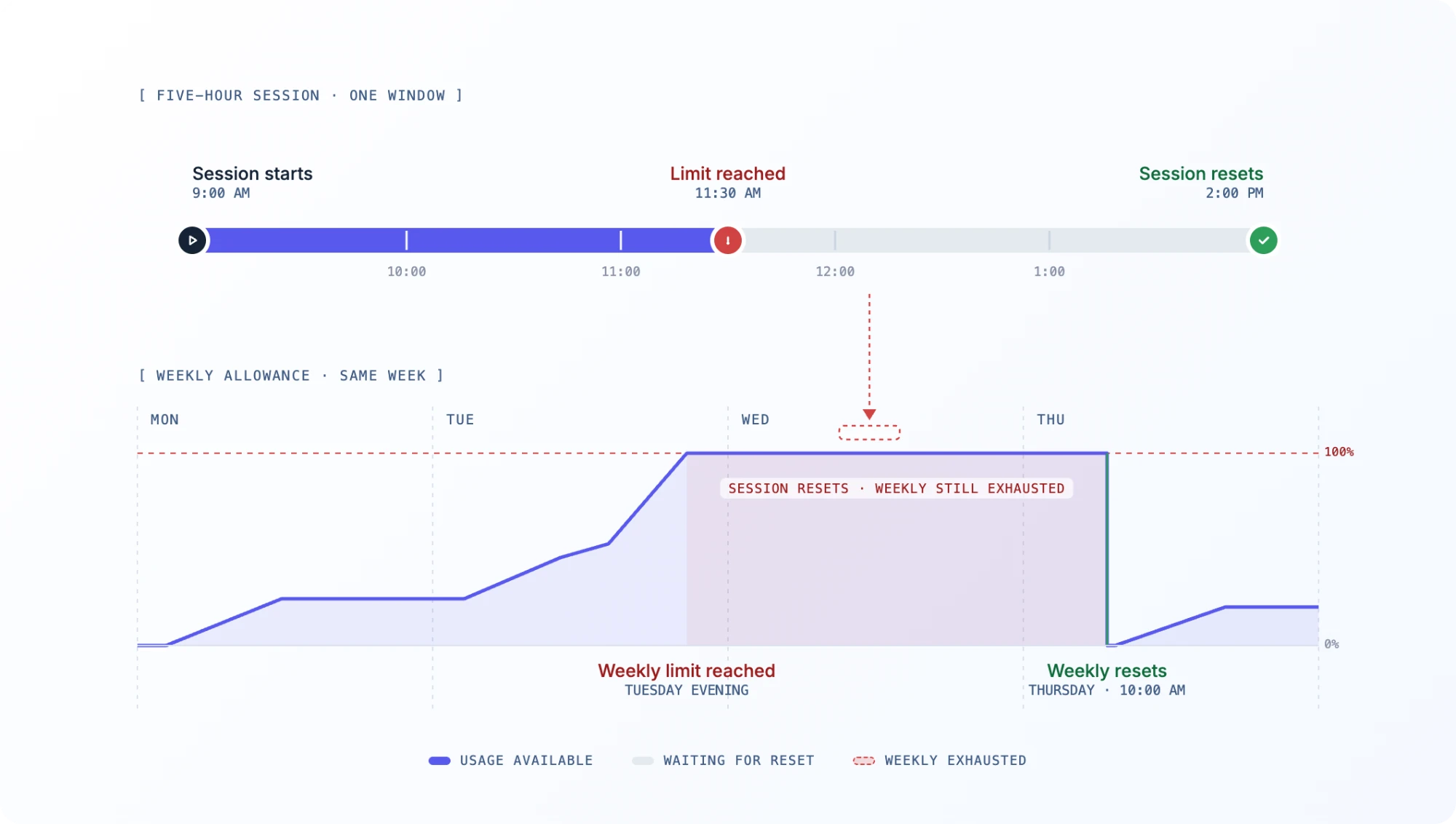
These limits operate independently. Your five-hour window can reset while your weekly allowance remains exhausted.
Anthropic may also apply additional restrictions to specific models, features, or accounts.
Usage Limits by Plan
| Plan | Session limit | Weekly limit |
|---|---|---|
| Pro | 5-hour window | Yes |
| Max | 5-hour window, with higher allowances | Yes |
| Ultra | No standard 5-hour limit on verified accounts | Yes |
| Team / Enterprise | Depends on the organization’s plan and billing configuration | Depends on plan |
| API billing | No subscription-based 5-hour allowance | API rate limits and billing controls apply |
Pro and Max both have five-hour and weekly limits, but Max provides higher usage allowances. Verified Ultra accounts do not have the standard five-hour session limit, although weekly restrictions still apply.
The number of prompts you can send isn’t fixed. A short request to modify one function consumes a different amount of usage than a debugging task involving repository analysis, terminal commands, and repeated code changes.
Claude Code also shares applicable subscription usage limits with Claude’s other interfaces. Using Claude on the web or in the desktop app can reduce the allowance available when you return to Claude Code.
For the latest plan-specific rules, refer to Anthropic’s usage and length limits documentation.
When Do Claude Code Usage Limits Reset?
The reset time depends on which allowance you’ve exhausted. A new five-hour window doesn’t restore your weekly allowance, and the two limits follow different schedules.
The Five-Hour Reset Window
Claude’s five-hour window starts when you send your first message of that usage period.
For example:
- 9:00 AM
- You start using Claude Code. The five-hour window begins.
- 11:30 AM
- You exhaust your session allowance.
- 2:00 PM
- The window resets and your session allowance is restored.
In this example, you only wait two and a half hours after reaching the limit, not another five hours.
The important distinction is that five hours describes the reset window, not five hours of guaranteed uninterrupted coding.
A demanding task can exhaust the allowance early. A lighter workload may allow you to work throughout the window without reaching the limit.
The Weekly Usage Reset
Weekly limits use a different schedule.
Anthropic assigns each account a fixed weekly reset day and time. This schedule doesn’t change based on when you last used Claude Code.
Suppose your weekly allowance resets every Thursday at 10:00 AM.
If you reach your weekly limit on Tuesday evening, you generally need to wait until Thursday for your included weekly allowance to return, even if your five-hour session window resets several times in between.
Weekly usage accumulates across your sessions and supported Claude interfaces.
You can find your exact weekly reset time in the Claude usage dashboard rather than calculating it manually.
Which Claude Code Limit Did You Hit?
Before trying a workaround, check the actual warning. Different restrictions require different fixes.
| Message or symptom | What it means | Recommended action |
|---|---|---|
| You’ve hit your session limit | Your session allowance is exhausted | Wait for the displayed time, use an eligible reset, or choose another available option |
| You’ve hit your weekly limit | Your weekly allowance is exhausted | Check the weekly reset, usage credits, or another coding connection |
| Requests continue using paid credits | Your usage is being billed beyond your included allowance | Check your credit balance and spending limits |
| You’ve hit your Opus limit, or your Sonnet limit | A limit specific to that model applies | Use /model to check for another permitted model |
| Context limit reached | Your conversation or request exceeds a context restriction | Reduce the context, compact the conversation, or start a new session |
A context window problem is especially important to distinguish from a subscription limit.
Usage limits control how much you can use Claude over time. Context limits control how much information a model can process in a conversation.
If your context window is full, waiting for a five-hour reset won’t address the underlying issue. Similarly, using /compact can reduce conversation context, but it won’t restore an exhausted usage allowance.
If you encounter an unexpected error that doesn’t match your usage status, check Anthropic’s error troubleshooting guide.
How to Check Your Claude Code Usage
The quickest way to inspect your subscription allowance is the built-in /usage command.
Open Claude Code and enter: /usage
The usage view shows applicable plan limits, usage information, and available reset details.
You can also open Claude in your browser and navigate to Settings → Usage.
Look for the current session allowance, weekly usage, and any additional restrictions that apply to your account.
Other Useful Claude Code Commands
Claude Code provides additional commands for inspecting your session and managing its context.
| Command | Purpose |
|---|---|
/usage | Check session usage, plan limits, and usage information |
/context | See what is currently occupying the context window |
/cost | Inspect usage and cost information, particularly useful with API billing |
/model | View or change the active model |
/compact | Summarize conversation history to free up context |
/clear | Start a fresh conversation while retaining project files and applicable project memory |
For example, if /usage shows that your weekly allowance is nearly exhausted, you’re dealing with subscription capacity.
If /context shows that your conversation is extremely large, you may be able to reduce the information processed by subsequent requests.
These are related problems, but they require different solutions.
Why Usage Runs Out Faster Than Expected
There isn’t a universal number of Claude Code prompts that guarantees you’ll stay within your allowance.
Usage depends heavily on the type of work you’re performing.
Long Conversations Carry More Context
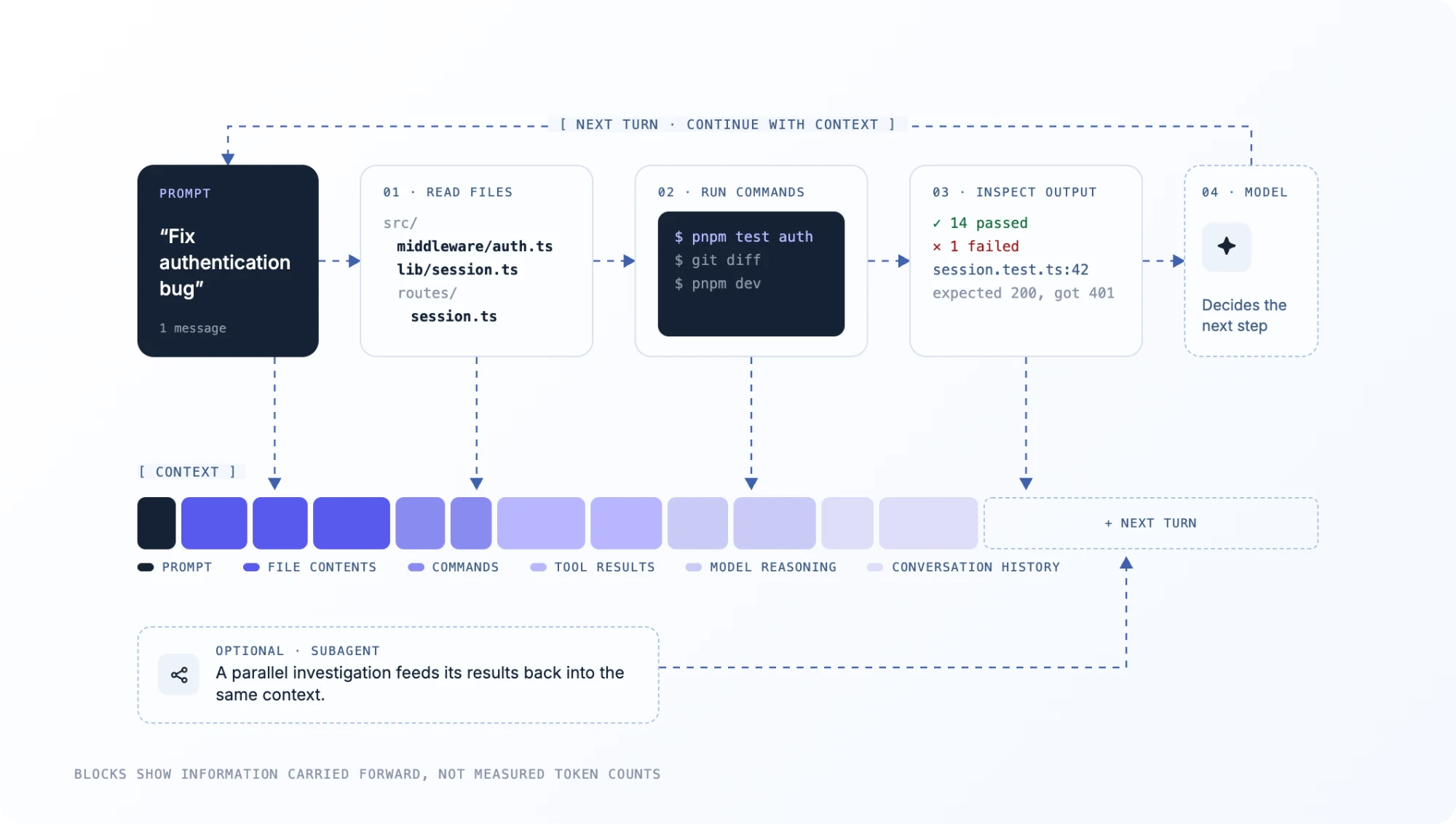
Like other AI coding agents, Claude Code may read files, inspect command output, propose changes, execute tests, and analyze the results during a debugging session.
As the conversation grows, more context may need to be processed in subsequent turns.
Consider two requests:
- Task A: “Explain what this function does.”
- Task B: “Trace the authentication failure across the middleware, session service, API routes, and database configuration. Fix it and verify the affected tests.”
Task B involves more investigation, file reads, tool calls, and potentially multiple attempts to resolve the issue.
Even a brief follow-up such as “try again” can consume substantial usage when it continues a large conversation.
Model and Reasoning Settings Affect Consumption
Different models and effort settings have different processing requirements.
Using a higher-reasoning configuration for every task may consume more usage than necessary.
That doesn’t mean you should always select the lightest model. Difficult debugging, architectural decisions, and complex code changes may justify a more capable option.
The goal is to match the model to the task rather than treating every request as equally demanding.
Tool Calls and Parallel Agents Add Work
Claude Code can inspect files, execute terminal commands, and delegate tasks to subagents.
These capabilities are useful, but they can also increase overall usage.
For example, sending multiple agents to independently investigate the same repository may duplicate file reads and analysis.
The same applies when Claude repeatedly runs failing tests without narrowing down the cause.
When consumption seems unusually high, inspect the actual workflow before assuming your plan’s allowance has changed.
What to Do When You Hit Your Usage Limit
Once you’ve identified the restriction, the next decision depends on how soon your allowance resets, how urgently the task needs to finish, and whether you want to pay for additional usage.
Here’s how the main options compare.
| Option | Best for | Trade-off |
|---|---|---|
| Wait for reset | Short interruptions | Work remains blocked until the allowance returns |
| Free limit reset | Eligible accounts with a reset available | Availability isn’t guaranteed |
| Usage credits | Continuing with Claude immediately | Additional consumption-based charges |
| API billing | Developers who want separately billed Claude access | Separate billing, configuration, and rate limits |
| Different coding agent | Developers with another available agent | May require context transfer and a different workflow |
| Multi-agent workspace | Developers regularly using several coding connections | Requires another available, configured connection |
1. Wait for the Next Reset
If your allowance returns in 15 minutes and you’re close to finishing a task, waiting may be the simplest choice.
Use the remaining time to inspect your Git diff, review the current implementation, or run tests manually.
But if your weekly allowance won’t reset for several days, waiting may be impractical for an active development project.
Check the actual reset time rather than assuming another five-hour window will solve every limit.
2. Use an Available Free Limit Reset
Anthropic occasionally provides eligible accounts with free limit resets.
Depending on the offer, a reset can immediately restore either your five-hour session allowance or your weekly allowance.
To check:
- Open Claude on the web or in Claude Desktop.
- Navigate to Settings → Usage.
- Look for Reset for free in the Resets section.
- Review which limit the reset applies to and whether it has an expiration date.
- Confirm if you want to use it.
These offers aren’t always available, and you can’t activate the reset button directly from Claude Code’s terminal or IDE interface.
After applying an eligible reset, the restored allowance also applies to Claude Code because usage is shared across your account.
See Anthropic’s limit reset documentation for details.
3. Switch to Another Available Model
If the warning applies specifically to a model or feature, another model may still be available.
Use: /model and review the available options before switching.
However, changing Claude models doesn’t reset an account-wide five-hour or weekly allowance. If your shared subscription usage is exhausted, choosing a different Claude model isn’t a guaranteed workaround.
4. Enable Usage Credits
Usage credits allow eligible paid subscribers to keep using Claude after their included limits are exhausted.
Once enabled, requests beyond your plan’s included allowance are billed according to applicable usage-based rates.
You can manage usage credits, funding, and spending limits through Claude’s usage settings.
This option makes sense when you want to remain on Claude without moving your task to another coding agent.
The trade-off is cost predictability. A complex task involving long context, repeated tool calls, and extensive reasoning can consume paid credits quickly.
Check your spending limit and whether automatic credit reloading is enabled before starting a demanding task.
Usage credits don’t change when your normal subscription allowances reset.
For more information, see Anthropic’s usage credits documentation.
5. Continue Through API Billing
Claude Code can also use an Anthropic API account or supported cloud provider instead of consuming your personal subscription’s included allowance.
API requests are billed separately, generally according to token consumption.
This can be useful if you already maintain an API account or want usage to be billed independently from your Claude subscription.
However, API access still has provider rate limits, billing restrictions, and potential spending caps.
Check which account is actually being billed. If the ANTHROPIC_API_KEY environment variable is set, Claude Code uses that key instead of your subscription once you approve it, and usage is billed to the API account tied to the key. See Anthropic’s authentication documentation for details.
Always verify your authentication and billing configuration before switching.
How to Keep Coding While Your Limit Resets
If you’ve exhausted your Claude Code allowance, the development task itself doesn’t necessarily need to stop.
You can continue through a different coding agent, provided you have another usable connection.
The challenge is transferring enough context to avoid repeating work or accidentally overwriting changes.
Continue a Partially Completed Task with Another Agent
Suppose Claude Code is investigating an authentication failure.
It has identified a middleware issue, modified two files, and started updating the tests. Then the session allowance runs out.
Your repository still contains the work completed so far, but the next agent needs to understand the current state.
Before switching:
- Check your branch and uncommitted changes using
git status. - Review modified files with
git diff. - Record what Claude has already changed and which tests have run.
- Open the same repository in another available coding agent.
- Ask the new agent to inspect the existing changes before continuing.
For example:
Prompt
Continue the authentication middleware fix in this repository. Inspect the current Git diff before making changes. The implementation is partially complete, but the affected tests still need verification. Preserve existing changes, run the relevant tests, and report any remaining failures.
A clear handoff reduces the risk of duplicating changes or restarting the investigation.
However, switching between separate tools can still require manual setup, a new conversation, and a summary of the work already completed.
For a broader comparison of available tools, see our guide, The 7 Best AI Coding Agents for Your Dev Stack in 2026.
Keep Coding with PandaOS
When you regularly use more than one AI coding agent, moving between separate interfaces can become another interruption.
PandaOS brings supported coding agents, model connections, and development tools into one local workspace, so you can work across different connections without rebuilding the same environment each time.
Consider the authentication issue from the previous example.
You’re debugging it through your connected Claude subscription. The middleware fix is partially complete, but Claude reaches its session limit before the tests are finished.
With another connection already configured in PandaOS, you can continue the conversation through an available agent such as Codex rather than starting a separate session and manually transferring the task.
PandaOS supports three capabilities that are particularly useful in this situation: usage monitoring, manual connection switching, and automatic failover.
Monitor Usage Before You Run Out
PandaOS includes a usage indicator in its chat interface for connections that report their allowances.
For supported Claude subscriptions and Codex connections, it can display how much of the applicable session or weekly allowance you’ve consumed.
The indicator changes color as usage increases and lets you inspect the reported limits and reset times.
This makes it easier to recognize when a connection is approaching its limit before starting another demanding task.
Usage visibility depends on the connection. Directly billed API keys, for example, don’t display the same subscription usage indicator.
Switch Agents Without Restarting the Conversation
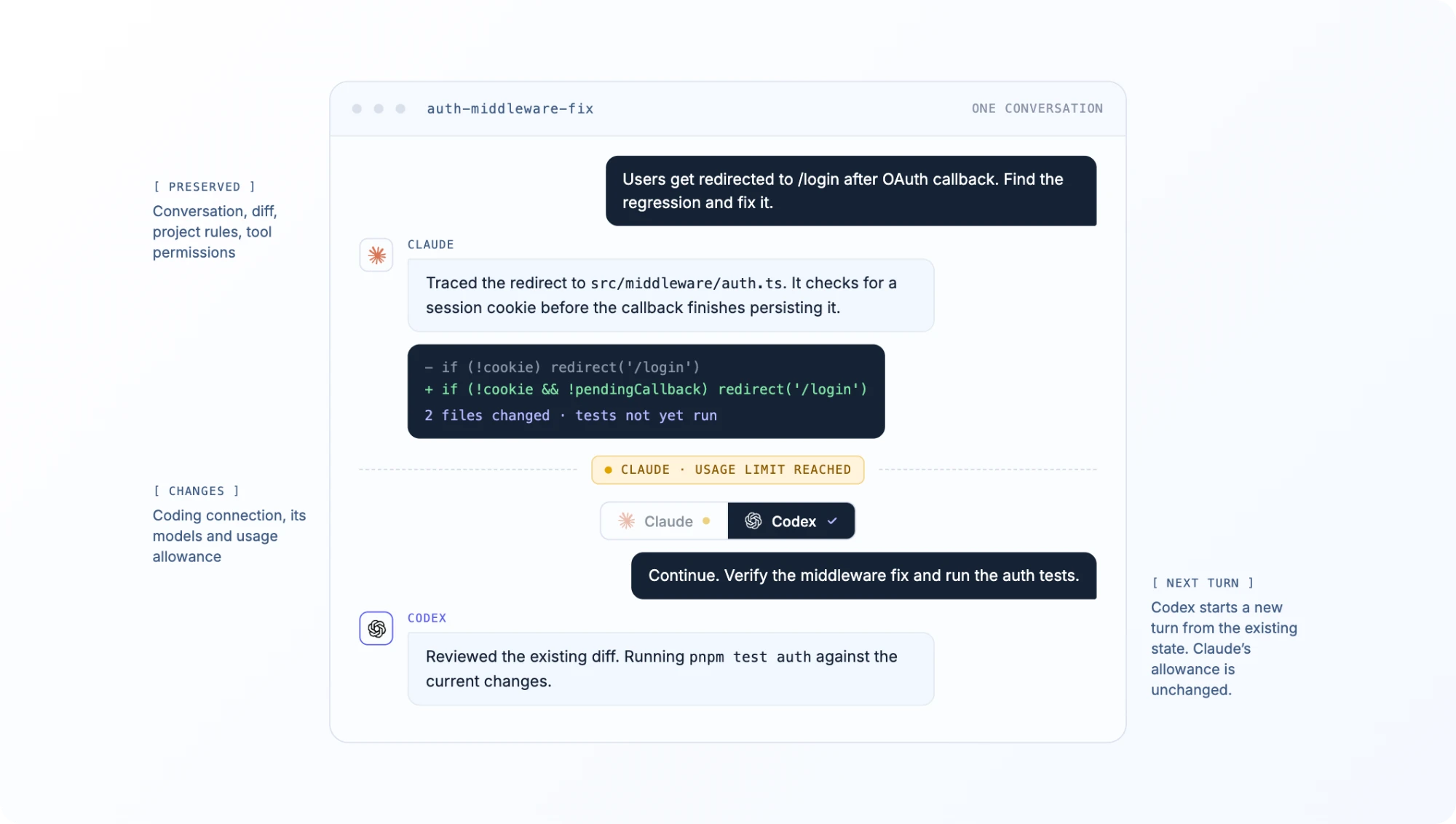
PandaOS allows you to change the coding connection handling an existing chat.
For example:
- You’re debugging a repository using your connected Claude subscription.
- Your Claude session reaches its usage limit.
- You open the connection picker in PandaOS.
- You select another available connection, such as Codex.
- Your next message continues in the existing conversation through the new connection.
The conversation and project configuration remain available. The next turn runs through the selected connection, with its own models, capabilities, and usage allowance.
You don’t need to manually export the conversation and recreate it in another tool.
PandaOS also preserves your project-level rules, connected apps, and applicable tool permissions when switching between supported agent backends.
The underlying agent may still behave differently, and usage is counted against whichever connection processes the turn.
Automatically Fail Over to Another Connection
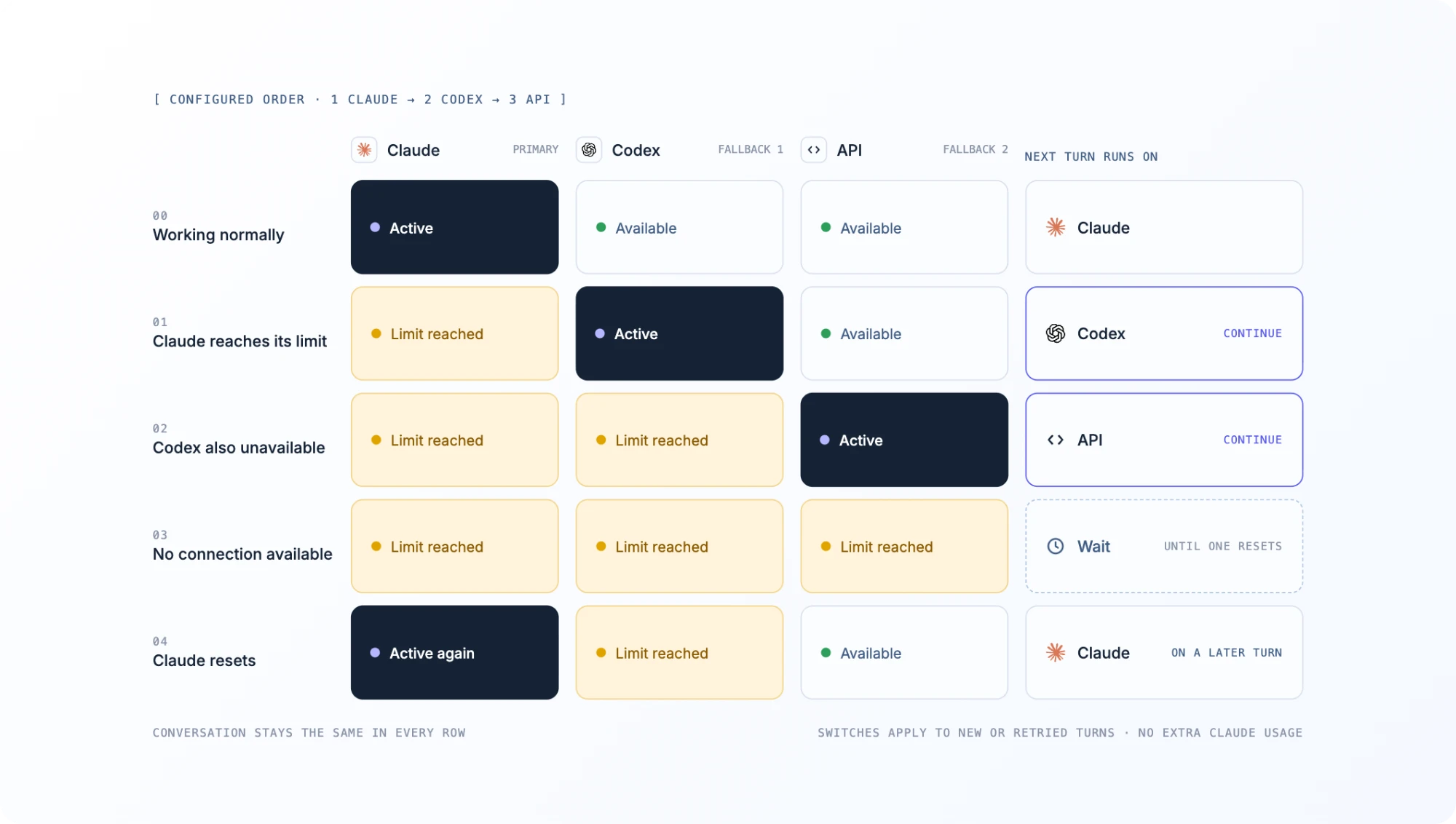
If you regularly use multiple coding connections, switching manually every time can become another repetitive step.
PandaOS supports optional usage-limit failover, which routes a chat to another available connection according to an order you configure.
You can enable it under Settings → Models → Keep going when usage runs out.
For example, your preferred connection order could be:
- Claude subscription
- Codex subscription
- Your own API-based connection
When the active connection runs out of usage, PandaOS can select the next eligible connection in the configured order.
The move happens when a turn is sent or retried, rather than silently changing the connection while the chat is idle.
PandaOS can also check whether your preferred connection has become available again and return to it on a subsequent turn, subject to its retry behavior.
If every configured connection is out of usage, the chat must wait for an available route. Waiting chats can resume automatically under supported conditions while PandaOS is open.
Failover is opt-in and available on paid PandaOS plans.
PandaOS doesn’t bypass Anthropic’s limits or add usage to your Claude subscription. It allows another connection you’ve configured to handle the work while your preferred one is unavailable.
For setup instructions, see the PandaOS usage-limit failover documentation.
For developers already working across Claude Code, Codex, and other AI agents, this removes much of the manual switching and context transfer that would otherwise interrupt a coding session.
How to Get More Out of Your Claude Code Allowance
Having a fallback helps when you reach a limit. Reducing unnecessary consumption helps you get more work from the allowance you already have.
Here are five practical habits worth adopting.
1. Clear Conversations When Switching Tasks
Claude Code carries conversation history into subsequent requests.
If you’ve finished fixing authentication and are about to work on an unrelated dashboard feature, there’s little reason to keep the previous debugging history in context.
Run: /clear
This starts a fresh conversation while preserving your repository files and applicable project memory.
Use it when the next task doesn’t depend on the previous conversation. If you need to preserve important information, save it before clearing the session.
2. Compact Long Sessions When You Still Need the Context
If you’re continuing the same task but the conversation has grown substantially, use: /compact
Claude Code summarizes earlier messages to reduce the context required for subsequent turns.
For example, after several rounds of debugging, you might compact the conversation before beginning final verification.
This can reduce future context processing, but summaries may omit details. Save critical implementation decisions, test results, or unresolved issues in your repository when needed.
Compaction is a context-management technique, not a way to reset your subscription allowance.
3. Narrow the Files Claude Needs to Inspect
Compare these two prompts.
Broad request
Find the authentication problem and fix it.
More focused request
Investigate the 401 responses from /api/session. Start with src/middleware/auth.ts and src/routes/session.ts. Identify the failing path and propose a fix before editing files.
The second gives Claude a clear starting point, a defined problem, and an expected output.
That doesn’t guarantee lower usage, but it can avoid unnecessary repository exploration when you already know where the issue is likely to be.
If those files don’t explain the failure, expand the scope based on what the investigation reveals.
4. Plan Larger Changes Before Executing Them
For tasks involving several files or systems, ask Claude to outline the implementation first.
For example:
Prompt
Before editing anything, identify the files involved in migrating authentication to the new session middleware. Explain the dependency changes, expected behavior, and tests that will need updating.
Review the plan and correct any incorrect assumptions before allowing the edits.
This is particularly valuable for refactoring, migrations, and cross-service changes, where an incorrect implementation can create repeated cycles of reverting and regenerating code.
5. Use the Right Model and Avoid Duplicated Agent Work
Choose model and effort settings based on task complexity.
Routine edits, clearly specified changes, and straightforward documentation updates may not require the most resource-intensive reasoning configuration.
For more complex investigations, a stronger model may be worthwhile.
The same principle applies to parallel agents. Delegate genuinely independent tasks instead of asking multiple agents to explore the same codebase without clear boundaries.
The goal isn’t to minimize every request. It’s to use your available allowance on meaningful development work rather than repeated investigation, unnecessary context, or avoidable rework.
Keep Your Workflow Moving
Claude Code’s session and weekly limits are separate, so the first step when you reach a restriction is to check /usage and identify when your allowance returns.
If the reset is close, waiting may be the simplest option. For longer interruptions, free limit resets, paid usage credits, API access, or another coding agent can offer ways to continue.
Reducing unnecessary context, narrowing investigations, and planning larger changes can also help you make better use of the allowance you already have.
And if you regularly work across several coding agents, PandaOS lets you monitor supported usage limits, switch connections within the same conversation, and configure failover when one connection runs out.
You can’t eliminate every provider limit. But you can build a workflow that doesn’t depend on a single connection always being available.
FAQ
Does Claude Code reset every five hours?
For Pro and Max subscriptions, the session allowance resets five hours after the usage window begins. Weekly limits remain separate, so a session reset won’t restore an exhausted weekly allowance. Verified Ultra accounts don’t have the standard five-hour session limit.
Does the usage limit reset at midnight?
Not necessarily. Five-hour session windows reset based on when the window started, while weekly allowances reset at an account-specific day and time. Check /usage or Settings → Usage to find your actual reset schedule.
Can I keep using Claude Code after reaching the weekly limit?
You may be able to continue using Claude through eligible usage credits, an available free reset, or separately billed API access. Otherwise, you need to wait for your weekly allowance to reset. You can also continue the development task through another available coding agent.
Does switching Claude models reset usage limits?
No. Changing Claude models doesn’t reset your account-wide allowance. It may help if a specific model is restricted while another remains available.
Is Claude Code usage separate from Claude’s web app?
No. When you’re using the same Claude subscription, applicable usage is shared across Claude Code, Claude on the web, and Claude Desktop.
Can PandaOS prevent Claude Code usage-limit interruptions?
PandaOS can’t change Anthropic’s usage limits. However, with another available connection configured, it lets you continue the same conversation through a different coding agent. Paid plans also support optional automatic failover between configured connections.