

Release Changelog
Release Notes From Your Git Diff, Posted to Slack
Ship the change, and the notes come from what the code actually does now, in words people outside engineering understand.
 Your Keys
 Hot-Swap AI Plans
 No Data Training
 Desktop-First
The problem
Why Release Notes Fall Behind the Release
The deploy is done in a minute. The notes take longer: digging through commits, remembering what each one meant, rewriting it for people who were not in the code, then pasting it into a channel or an email. So they get written late, from memory, or not at all.
- Commits
- The deploy
- The diff
- Release notes
- The announcement
How PandaOS Handles the Release
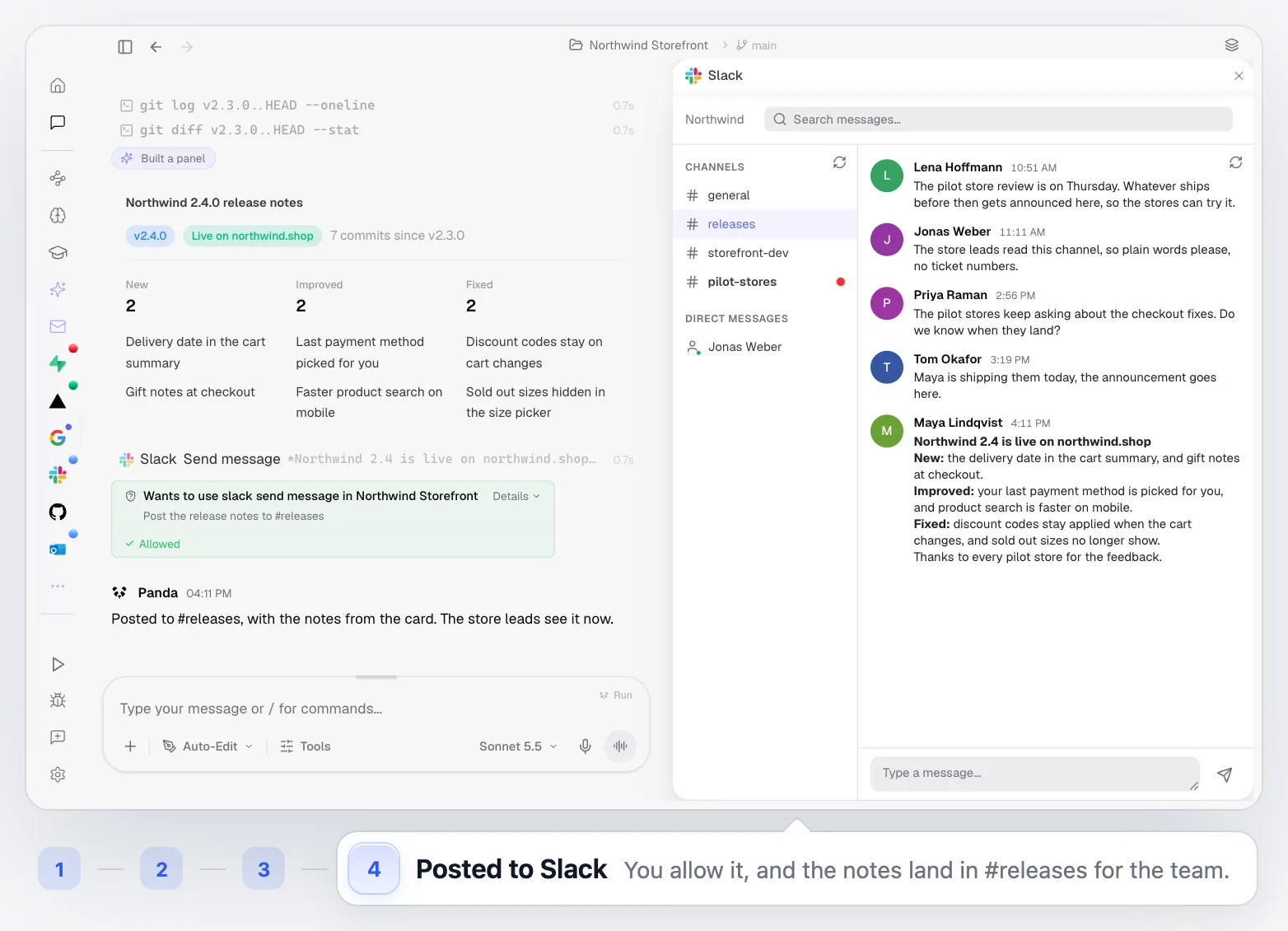
The notes show up as a card in the chat first, and nothing reaches Slack until you allow it.
Ship the pilot store fixes to production. Then write the release notes from the diff since v2.3.0 and post them to #releases.
- 01
Push the Change
Ask for the release in plain words. PandaOS pushes to your branch from the built-in terminal.
GitHub - 02
Watch the Deploy
Your existing Vercel project builds it. PandaOS checks the deployment until it is Ready.
Vercel - 03
Read the Real Diff
PandaOS reads the git log and the diff since the last release, so the changelog comes from the commits themselves, not from memory.
GitHub - 04
Write the Notes
Changes grouped the way readers care about them: new, improved, fixed, in plain language.
Chat - 05
Post the Announcement
The notes go to your team's Slack channel. PandaOS asks first, so nothing is posted until you allow it.
Slack - 06
Keep the Record
The chat holds the release, the notes and the post together for the next time someone asks what shipped.
Chat
Best for Teams That Ship Often
The more often you release, the more a changelog written by hand costs you.
Weekly or Daily Releases
Keep notes for every release without setting aside time to write them.
Customer-Facing Changelogs
Turn commit messages into language your users and support team understand.
Stakeholder Updates
Tell sales, support or a client what changed the moment it is live.
Small Teams Without a PM
Let the person who shipped it announce it, without a second job.
Built Into the Rest of PandaOS
The release flow uses parts of PandaOS you can use on their own.
Ship and Announce in One Go
Keep the code, the deploy and your team's channels in one workspace, and let every release arrive with its notes.
FAQ
Where do the release notes come from?
From your repository: the commits and the code changes since your last release tag.
Do I need Vercel for this?
No. Vercel is one supported integration and the one shown here. PandaOS can push to any Git remote from its terminal and work with the deployment flow you already use.
Does PandaOS post to Slack without asking?
No, not unless you let it. Posting a message asks first by default, and every connected app has per-action controls: run on its own, ask you first, or stay off.
Can I edit the notes before they go out?
Yes. The notes appear in the chat first. Ask for changes in plain words, or edit them yourself, then send.
Can I automate release notes after every deploy?
Yes. Turn the same request into an Automation that runs on a schedule or when something happens in your connected apps.


