

Competitive Site Audit
Compare Competitor Websites Without the Tab Juggling
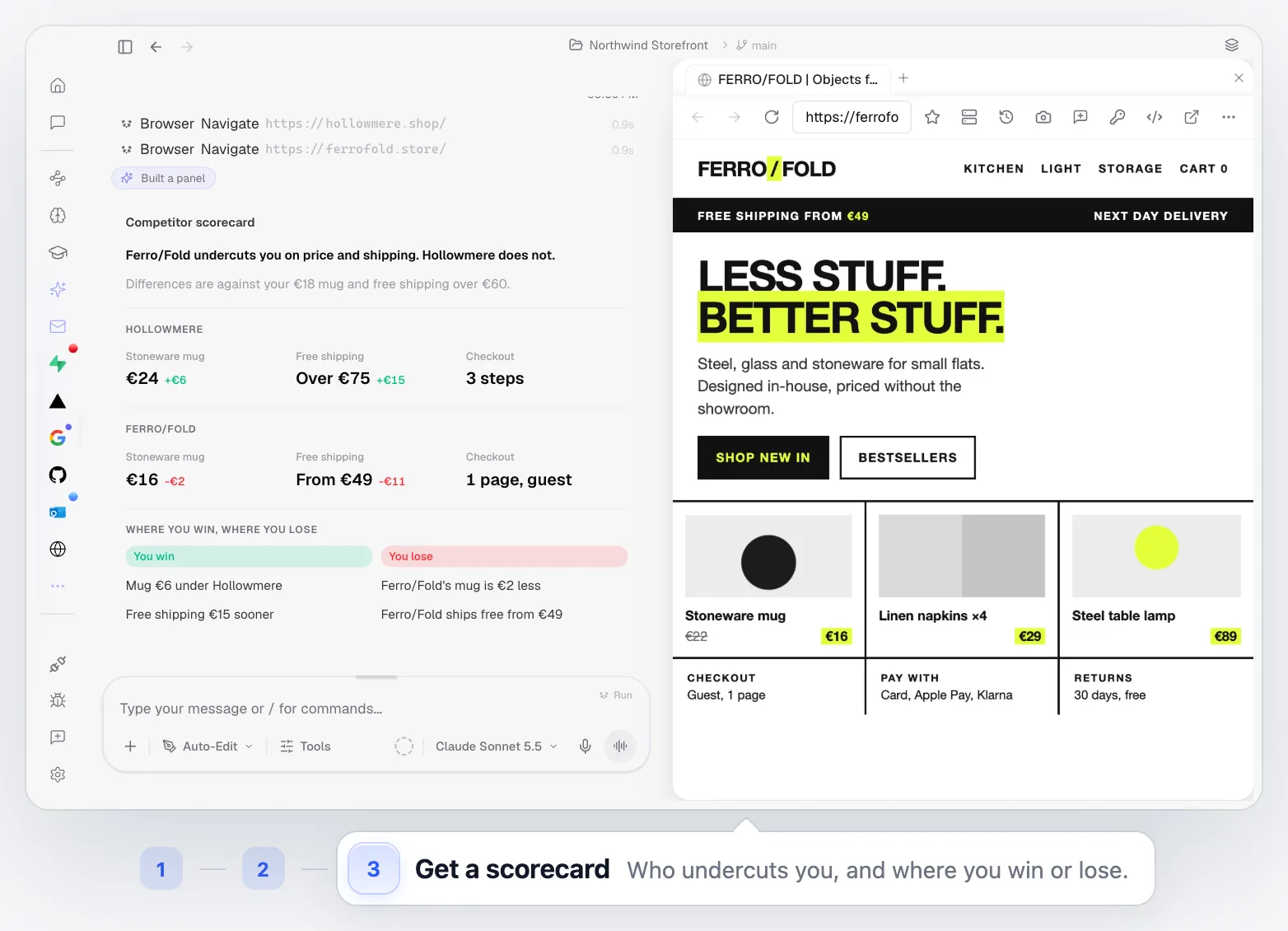
Name the sites. PandaOS opens them in its built-in browser, checks prices, shipping and checkout, and returns a scorecard of where you win and where you lose.
 Your Keys
 Hot-Swap AI Plans
 No Data Training
 Desktop-First
The problem
Why Competitor Research Never Feels Finished
It starts with two tabs and ends with twenty: screenshots in a folder, notes in a doc, a pricing table copied by hand. By the time it is written up, someone has changed their homepage.
- Their sites
- Screenshots
- Pricing pages
- Checkouts
- Notes
- A spreadsheet
How PandaOS Runs the Audit
The scorecard is built from what is on the pages right now, not from last quarter's screenshots.
Our mug is €18, free shipping over €60. How do hollowmere.shop and ferrofold.store compare?
- 01
Name the Sites
Give PandaOS the addresses and what you want compared.
Chat - 02
Visit Each One
It opens every site in the built-in browser, the way a visitor would.
Built-in browser - 03
Capture the Evidence
It takes screenshots and reads the copy, the pricing and the key pages.
Built-in browser - 04
Compare What Matters
Pricing, positioning, copy, features and checkout, side by side.
Chat - 05
Get the Report
A structured comparison in the chat, with the gaps and the strengths called out.
Chat - 06
Keep It Current
Run it again next month, or on a schedule, and see what changed.
Automations
Best for Teams That Watch Their Market
When the answer lives on other people's websites.
Positioning and Copy
See how competitors describe the same problem, and where your message stands out.
Pricing Research
A competitor price comparison without the spreadsheet: plans, prices, shipping thresholds and what each tier includes, in one table.
UX Reviews
Compare navigation, onboarding and checkout flows step by step.
Launch Prep
Know what the market looks like the week before you ship.
Built Into the Rest of PandaOS
The parts of PandaOS this workflow runs on, each worth a look on its own.
Know Your Market in One Request
Spend your time on what the comparison means, not on collecting it.
FAQ
How does PandaOS visit the sites?
With its built-in browser. It can navigate pages, interact with them, take screenshots and read what is on screen, the same way you would.
Can it compare more than two sites?
Yes. Name as many as you need. The comparison grows a column per site.
Can it go through a checkout or a sign-up flow?
It can click through public pages and flows. It will not enter payment details or create accounts unless you explicitly ask and provide them.
What format is the report in?
A scorecard in the chat by default: who undercuts you, and where you win or lose. Ask for a document or a slide deck on the Design canvas instead.
Can this run regularly?
Yes. Turn the request into an Automation and get a fresh comparison every week or month.
Does it show competitor traffic or keywords?
No. It reads their pages the way a customer sees them: prices, shipping, copy and checkout. For traffic and keyword data, pair it with an SEO tool.


