

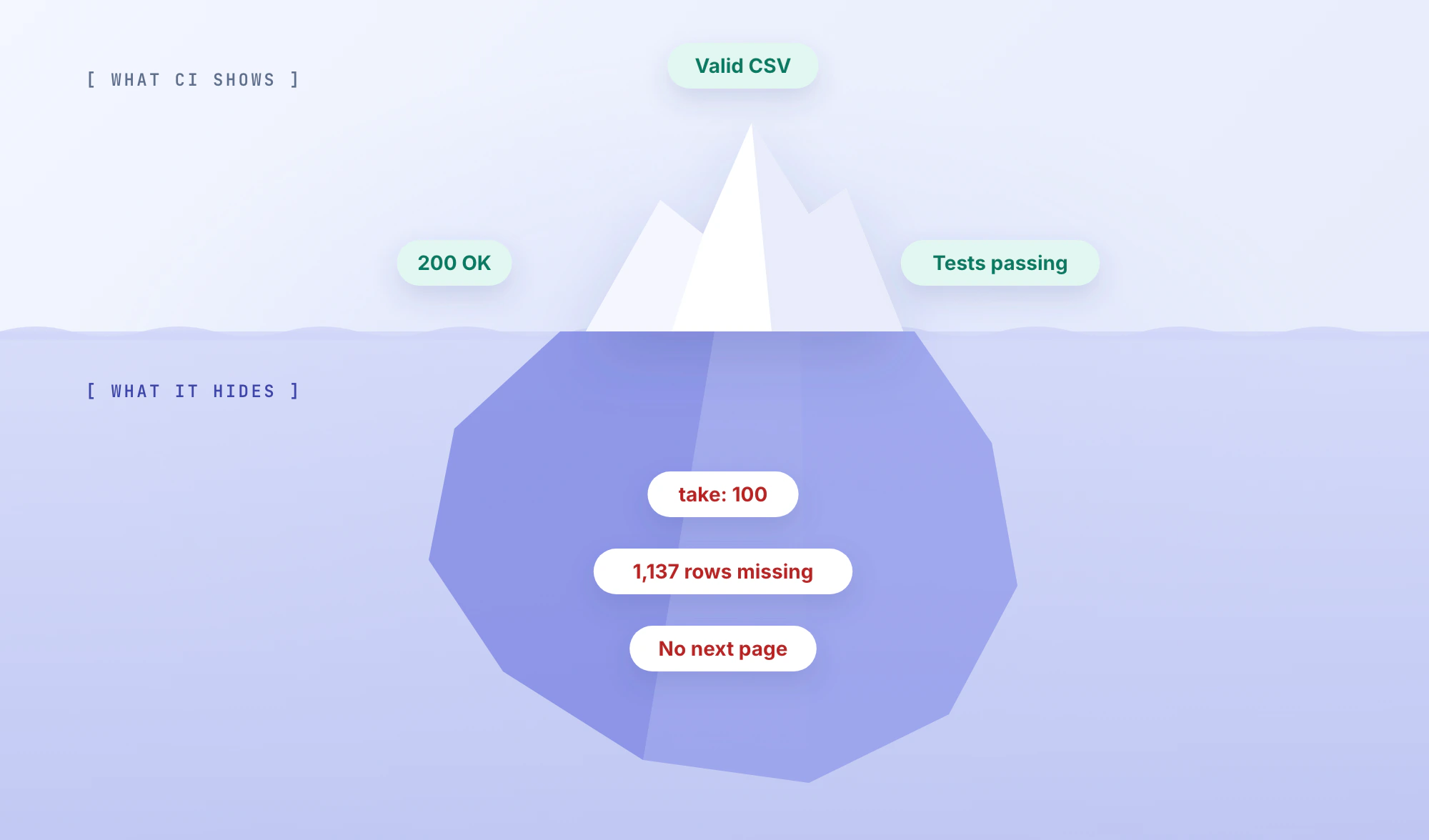
An AI coding agent implements a feature, the build passes, and the pull request looks reasonable. Then someone tests the actual workflow. The API returns 200 OK, the UI shows a success message, but half the data is missing.
Nothing crashed. The code is valid. The tests are green. The implementation is still wrong.
AI-generated code can fail in ways that are difficult to spot during a quick diff review. An agent might call an outdated API, miss a business rule, modify a shared function without updating its consumers, or produce tests that never exercise the failing condition.
Debugging these failures requires more than prompting the agent to try another fix. You need to reproduce the behavior, trace execution to the point of failure, identify the underlying cause, and verify that the correction doesn't introduce another regression.
This guide walks through that process using TypeScript, Prisma, and Vitest, with practical techniques you can apply to AI-assisted development in any stack.
TL;DR
- Reproduce the bug before modifying code. Record the failing input, expected result, actual behavior, and relevant commit.
- Trace execution to find the first incorrect result. Logs, database queries, and runtime evidence are more useful than speculative fixes.
- Watch for silent failures, missing business rules, outdated APIs, async bugs, and incomplete refactors.
- Add a regression test that fails before the patch and passes afterward.
- Verify the complete workflow. Passing unit tests don't guarantee the API, database, and UI behave correctly together.
Start With the Failure, Not Another Prompt
When AI-generated code breaks, the fastest-looking solution is often to paste the error into the same agent and ask it to fix the issue.
That can work for an obvious syntax error. It's much less reliable when the symptom doesn't reveal the cause.
Consider an export endpoint that returns 100 customer records instead of 1,237. An agent might rewrite the CSV serializer, modify the API response, or change frontend state handling without checking whether the database query returned the full dataset.
Those changes may look reasonable while leaving the original defect untouched.
Before making another edit, establish four facts:
| Evidence | What to Record |
|---|---|
| Expected behavior | What the feature is required to do |
| Actual behavior | What the application does with a specific input |
| Reproduction | The request, dataset, environment, and steps needed to trigger the failure |
| Change history | The commit, PR, or configuration change that may have introduced it |
A useful bug report is specific enough to become a test case.
Instead of:
The AI-generated export doesn't work. Fix it.
Write:
The customer export returns HTTP 200 and a valid CSV, but only 100 of 1,237 matching active customers are included. The issue reproduces against a fixed dataset. Check the query and export path before making changes.
The second version gives both the developer and the coding agent a measurable failure condition.
Inspect the Changes That Introduced the Bug
Start by checking the repository state:
git status --short
git log --oneline -5
git diff --stat BASE...HEAD
git diff BASE...HEAD
Replace BASE and HEAD with the appropriate revisions. The three-dot syntax compares against the merge base, which is useful for reviewing a branch. For a production regression, compare the actual deployed revisions instead.
Look beyond the file named in the bug report.
An agent may have updated a shared utility, changed a database query, altered an error handler, or modified test fixtures in the same PR. The fault may be in a dependency of the reported component.
Pay particular attention to removed assertions, skipped tests, and changes to configuration or dependency versions.
A green CI run tells you that the checks executed successfully. It doesn't establish that those checks still cover the original requirements.
Find the First Point Where Execution Goes Wrong
Once you can reproduce the failure, trace the affected path through the system.
For a typical web application, that might look like:
Browser → API Route → Service → Database → Response
The goal is to identify the earliest point where the observed data or state diverges from what the feature requires.
Suppose the UI displays 100 records.
Open the browser's Network panel and inspect the API response. If the response already contains only 100 records, changing the frontend's rendering logic won't solve the underlying problem.
Next, inspect the service responsible for assembling the response. If the service receives 100 records directly from the database query, you've narrowed the investigation again.
At each boundary, compare the input and output:
- Did the request contain the expected filters and parameters?
- Did the service construct the correct query?
- Did the query return the expected records?
- Did a transformation drop or overwrite data?
- Was an error swallowed or converted into a successful response?
Use request IDs to correlate logs across services. Add temporary instrumentation when needed, but log counts, execution paths, and safe identifiers rather than credentials or sensitive records.
Don't start a broad refactor while you are still locating the failure.
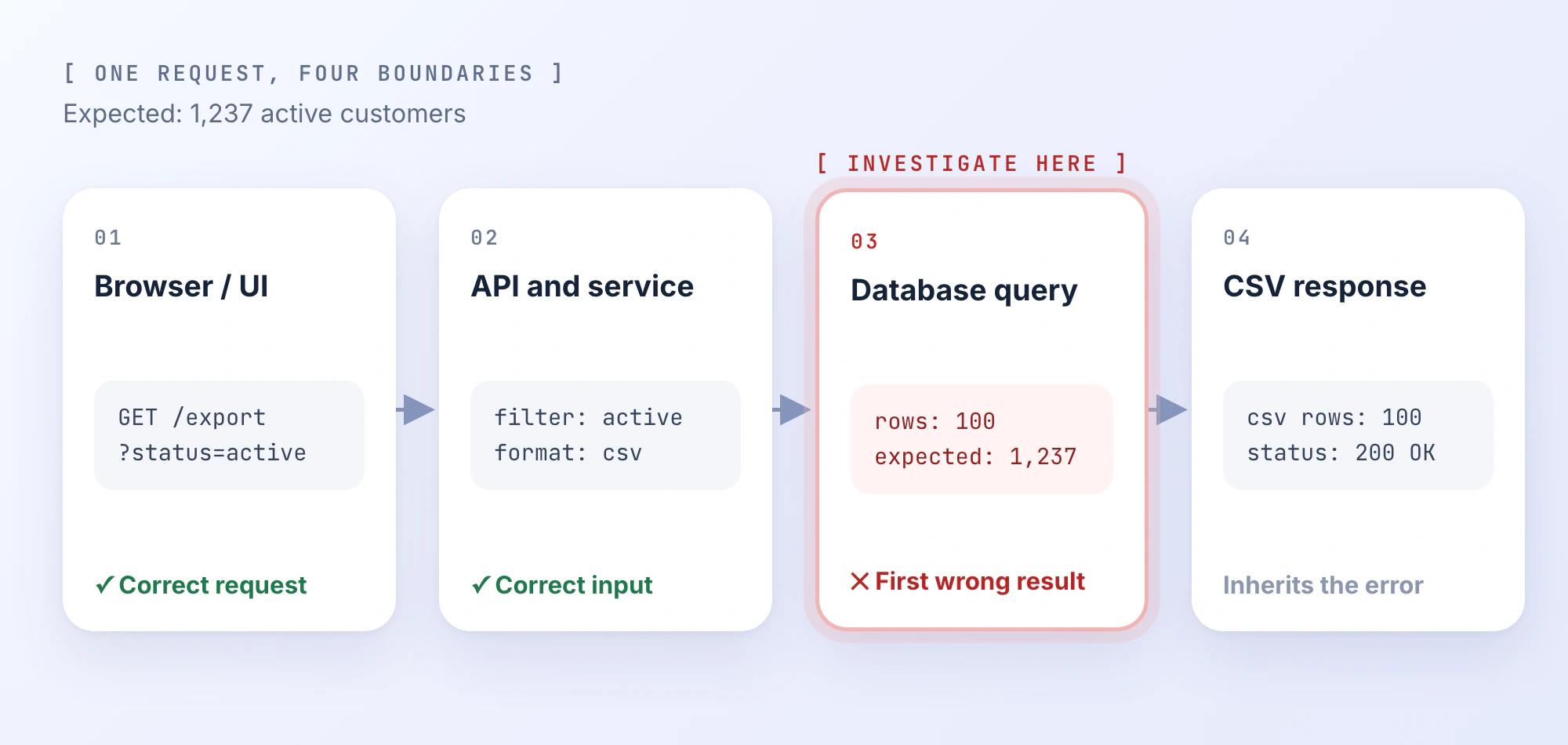
The distinction between a symptom and its root cause matters here.
A dashboard showing incomplete data is a symptom. A database query returning one page is the failing operation. Treating a paginated result as a complete dataset is the implementation mistake that needs to be corrected.
Once you've found that boundary, write a hypothesis you can test.
For example:
The export retrieves only the first 100 matching records because the query uses a page limit without fetching subsequent pages.
Now you have something concrete to confirm or disprove.
Example: An Export That Silently Drops Records
Let's work through that failure in a TypeScript application using Prisma.
This is an illustrative, reproducible scenario rather than a reported PandaOS production incident. The examples assume a Prisma Customer model with a unique integer id and a Boolean active field, using the prisma.customer.findMany() client API.
The feature requirement is straightforward: export every active customer to CSV.
The AI-generated implementation works with the small dataset used during development. The downloaded CSV opens correctly, and the endpoint returns 200 OK.
A larger dataset exposes the defect.
| Check | Result |
|---|---|
| Matching active customers | 1,237 |
| Exported data rows | 100 |
| HTTP response | 200 OK |
| CSV format | Valid |
| Runtime exception | None |
The feature is returning a successful response with an incomplete result.
Step 1: Inspect the Query
The data-fetching function looks like this:
import type { PrismaClient } from "@prisma/client";

export async function getActiveCustomers(
  prisma: PrismaClient
) {
  return prisma.customer.findMany({
    where: { active: true },
    take: 100
  });
}
There's nothing syntactically wrong with the query.
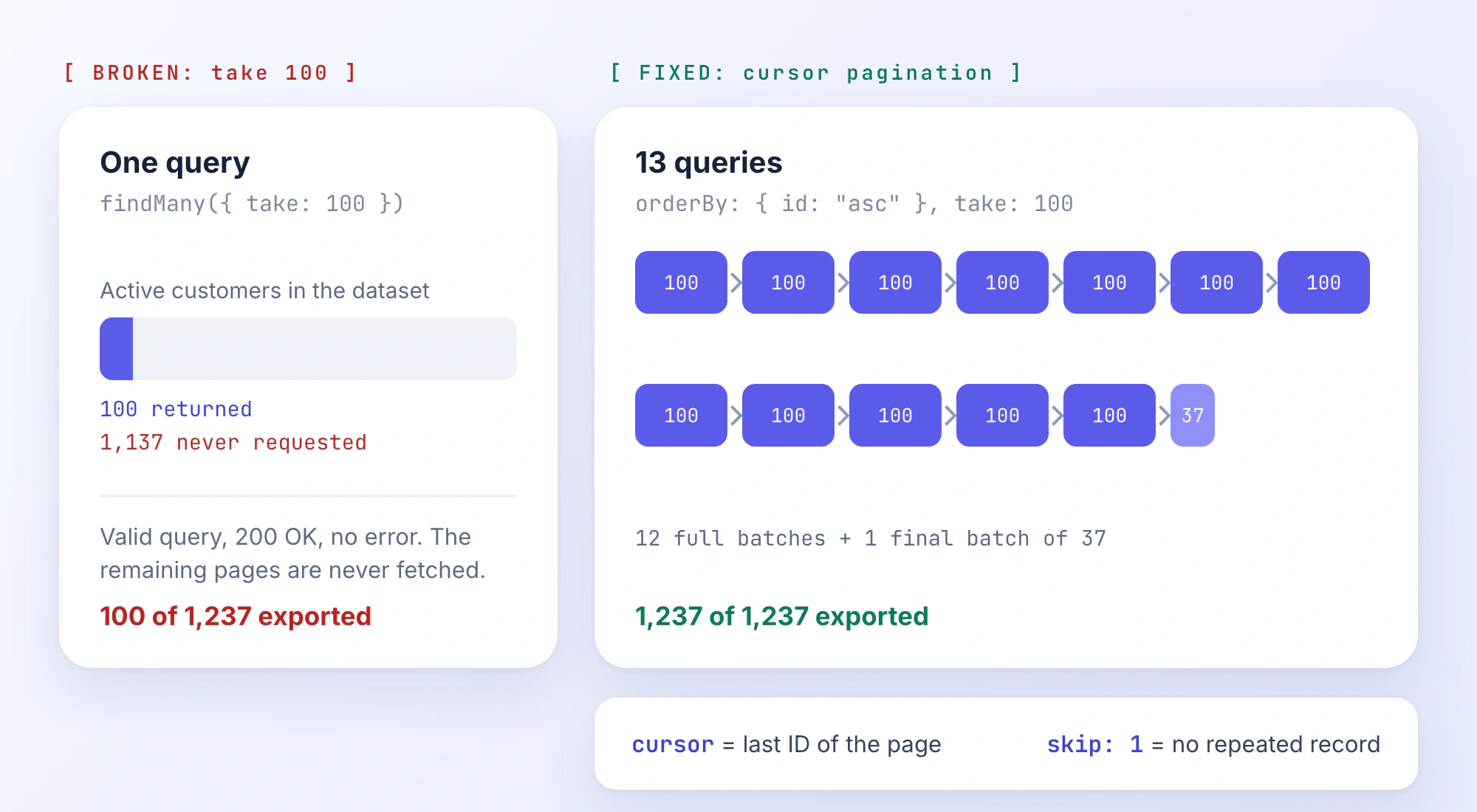
In Prisma, take limits how many records a query returns. Here, it retrieves at most 100 active customers.
That behavior is appropriate for a paginated list. It doesn't satisfy a requirement to export every matching customer.
The problem isn't the existence of a limit. It's that the function never requests the remaining pages.
Step 2: Confirm the Root Cause
Compare the number of matching records in the database with the number returned by the function.
const expected = await prisma.customer.count({
  where: { active: true }
});

const actual = await getActiveCustomers(prisma);

console.log({
  expected,
  actual: actual.length
});
With a stable example dataset, the output is:
{ expected: 1237, actual: 100 }The count and export query use the same active filter, so we're comparing the same logical dataset.
Next, inspect the caller.
Does another function request the remaining pages? Does the CSV writer receive a stream, or does it serialize this array directly? Is there a separate API-level limit?
If the caller serializes the returned array and no additional queries run, the evidence supports the hypothesis.
The export is incomplete because its data-access function retrieves only one page.
Be careful when diagnosing this against a live database. If records change between the count and retrieval operations, those results may represent different database states. A fixed fixture makes the reproduction deterministic.
Step 3: Write a Test That Exposes the Boundary
The original tests may have used 10 or 20 customer records. A fixture that small wouldn't detect a limit of 100.
A stronger regression test must cross the page boundary.
Let's use 237 active customers. With a page size of 100, a complete implementation should retrieve three batches: 100, 100, and 37.
The following Vitest example uses a mock that models cursor-based pagination:
import { expect, it, vi } from "vitest";
import type { PrismaClient } from "@prisma/client";
import { getActiveCustomers } from "./export";

it("returns all records without gaps or duplicates", async () => {
  const records = Array.from(
    { length: 237 },
    (_, i) => ({
      id: i + 1,
      active: true
    })
  );

  const findMany = vi.fn(async (query: {
    take: number;
    cursor?: { id: number };
    skip?: number;
  }) => {
    const start = query.cursor
      ? records.findIndex(
          row => row.id === query.cursor!.id
        ) + (query.skip ?? 0)
      : 0;

    return records.slice(
      start,
      start + query.take
    );
  });

  const prisma = {
    customer: { findMany }
  } as unknown as PrismaClient;

  const result = await getActiveCustomers(prisma);

  expect(result).toHaveLength(237);

  expect(
    new Set(result.map(row => row.id)).size
  ).toBe(237);

  expect(findMany).toHaveBeenCalledTimes(3);
});
The mock deliberately uses a simplified dataset and pagination contract. It doesn't replace a real Prisma integration test.
Against the original implementation, the test fails: the function returns only 100 records and executes one query.
The test establishes two requirements that a successful HTTP response doesn't cover:
- Every expected record must be present.
- No record may appear more than once.
The query-count assertion also checks the intended pagination behavior, although query counts are implementation-specific and should be updated if the pagination strategy changes.
Step 4: Implement Cursor-Based Pagination
Prisma supports cursor-based pagination, which is suitable for iterating through large ordered result sets.
For this example, we can use each batch's final customer ID as the cursor for the next query.
import type {
  Customer,
  PrismaClient
} from "@prisma/client";

export async function getActiveCustomers(
  prisma: PrismaClient
): Promise<Customer[]> {
  const all: Customer[] = [];
  let cursor: number | undefined;

  while (true) {
    const batch = await prisma.customer.findMany({
      where: { active: true },
      orderBy: { id: "asc" },
      take: 100,
      ...(cursor === undefined
        ? {}
        : {
            cursor: { id: cursor },
            skip: 1
          })
    });

    all.push(...batch);

    if (batch.length < 100) {
      break;
    }

    cursor = batch[batch.length - 1].id;
  }

  return all;
}
This changes the behavior in a few important ways.
Every request applies the same filter. Records are ordered by a unique ID, giving the pagination process a deterministic sequence for an unchanged dataset.
After each full batch, the function stores the last ID as a cursor. The next query uses skip: 1 to exclude that cursor record from the following page.
Without the skip, the boundary record could appear twice.
The loop continues until a query returns fewer than 100 records. If the final page contains exactly 100 records, the next query returns an empty batch and terminates the loop.
For 237 records, the function executes three queries. For 1,237 records, it executes 13.
This fixes the incomplete retrieval in the example, but it isn't automatically a production-ready export architecture.
The function still accumulates every customer in memory. For very large exports, consider fetching batches and streaming serialized rows into a file or response with appropriate backpressure.
There is also a consistency requirement to consider.
Cursor pagination prevents ordinary page-boundary duplication when the ordered dataset is stable. It doesn't guarantee a point-in-time snapshot if matching records are inserted, updated, or deleted during the export.
If the business requires an exact snapshot, the implementation needs an appropriate database consistency strategy. That may involve a suitable transaction isolation level, a fixed cutoff, or a snapshot-based export process.
Those are separate requirements from simply retrieving every page.
Step 5: Verify the Export, Not Just the Query
The regression test now covers the pagination loop, but it doesn't prove that the CSV endpoint works correctly.
The mocked findMany function doesn't execute SQL. It doesn't exercise the real Prisma client, database permissions, network failures, or the CSV serializer.
Run a database-backed integration test using known records, then test the actual endpoint.
For the integration test, verify:
- Zero, one, and multiple matching records
- Exactly 100 and 101 records
- More than two complete pages
- Active and inactive records in the same dataset
- No missing or duplicated IDs
The 100-record boundary is particularly useful. With this implementation, exactly 100 records should produce one full query and a second empty query.
Then download the generated CSV and parse it using a CSV library.
Don't count rows by splitting the file on newline characters. Quoted CSV fields can legitimately contain line breaks.
After parsing the data rows, assertions might look like:
expect(csvRows).toHaveLength(237);

expect(
  new Set(csvRows.map(row => row.id)).size
).toBe(237);
Also inspect the headers, escaping, field values, and error behavior. The export must preserve the expected response contract.
For a higher-confidence repair, establish a baseline using the broken implementation, run the same test against the patch, and check that reverting the patch makes the original failure return.
That provides stronger evidence that the change actually addresses the defect rather than merely coinciding with a passing test.
The important outcome isn't that the agent generated a new function. It's that the original failing behavior is gone and the relevant constraints remain satisfied.
Other AI Coding Failures Worth Checking
Incomplete pagination is one example of a broader problem: generated code may be technically valid while violating assumptions about the surrounding application.
These five failure patterns deserve particular attention when investigating AI-assisted changes.
| Failure Pattern | Typical Symptom | What to Inspect |
|---|---|---|
| Outdated or nonexistent API | Missing method, invalid import, unexpected response | Installed package version, type definitions, version-specific docs |
| Missing business rule | Happy path works, boundary cases fail | Acceptance criteria, domain constraints, test fixtures |
| Incomplete refactor | One feature works, another regresses | Call sites, shared interfaces, background jobs, integration tests |
| Async or state bug | Intermittent failures, stale results, premature success | Promise handling, execution order, shared state, retries |
| Suppressed errors | UI reports success despite an unsuccessful operation | Catch blocks, fallbacks, logging, error contracts |
Outdated SDK Calls and Invented Methods
An agent may generate a plausible method that doesn't exist in the installed SDK, or use parameters from another version.
TypeScript often catches these mistakes during type-checking, but loosely typed integrations and dynamic APIs may fail only at runtime.
Check the project's lockfile and installed package version before changing the dependency. Then inspect the actual exported types or documentation for that version.
Don't upgrade a package simply because the generated code appears to expect a newer API. The least risky fix may be to correct the call instead.
Business Logic That Passes the Happy Path
Consider a discount calculation:
const discount = order.total * 0.2;The arithmetic works.
But what if shipping isn't discountable, certain items are excluded, and the discount has a maximum value?
Those rules won't be enforced unless they are represented in the implementation.
The investigation should begin with the business contract, not the arithmetic.
Build test cases that isolate each constraint. Include mixed eligible and ineligible items, minimum and maximum values, and combinations that expose the interaction between rules.
An implementation can be mathematically correct and still violate the product's requirements.
Refactors That Miss a Consumer
An agent changes a function used by the API and a scheduled job, but updates only the API caller.
The application may compile if the old and new payloads remain structurally compatible. The scheduled job can still produce the wrong result.
Search for references to the modified function, exported types, events, and configuration keys.
For externally consumed interfaces, inspect contract tests and compatibility requirements as well as local call sites.
The relevant question is whether every consumer still satisfies its contract, not whether the modified function passes its own unit tests.
Async Operations That Report Success Too Early
Consider:
async function updateProfile(user: User) {
  saveUser(user);

  return { success: true };
}
If saveUser returns a promise, the handler doesn't wait for persistence before reporting success.
A failure can occur after the caller has already received a successful response.
Where the contract requires persistence before success, the correction is straightforward:
async function updateProfile(user: User) {
  await saveUser(user);

  return { success: true };
}
But not every async workflow should block until completion.
For background jobs, the correct contract may be an accepted status, a job ID, and a separate completion state. Check what the API promises before changing the execution model.
Error Handling That Hides the Actual Failure
Another pattern is a catch block that converts unrelated errors into a valid-looking result:
try {
  return await fetchInvoice(id);
} catch {
  return null;
}
Now an authentication failure, timeout, or database outage may be indistinguishable from a missing invoice.
The caller may interpret null as an ordinary not-found response.
Inspect the exception path and determine which failures should produce a legitimate fallback and which should propagate as errors.
Preserve meaningful error categories, attach useful context to logs, and test failure paths explicitly.
The objective is to make failures observable without exposing internal details to the end user.
Why Passing Tests Can Still Hide Broken Code
A green test suite is useful evidence, but only for the behavior the tests actually exercise.
This becomes particularly important when an AI coding agent writes both the implementation and its tests. The tests may reinforce the same mistaken interpretation of the requirement.
In the CSV example, a test that checks only response.status === 200 would pass even though most records were missing.
There are several common ways this happens.
Mocks reproduce the wrong assumptions. A mocked service returns the expected value without exercising the database query responsible for the defect.
Fixtures miss important boundaries. Tests contain 10 records while the implementation fails at 101.
Assertions check mechanics instead of outcomes. A test confirms that a function was called but never inspects what the user receives.
The agent weakens existing coverage. A failing assertion is removed, a test is skipped, or the fixture is changed to accommodate the implementation.
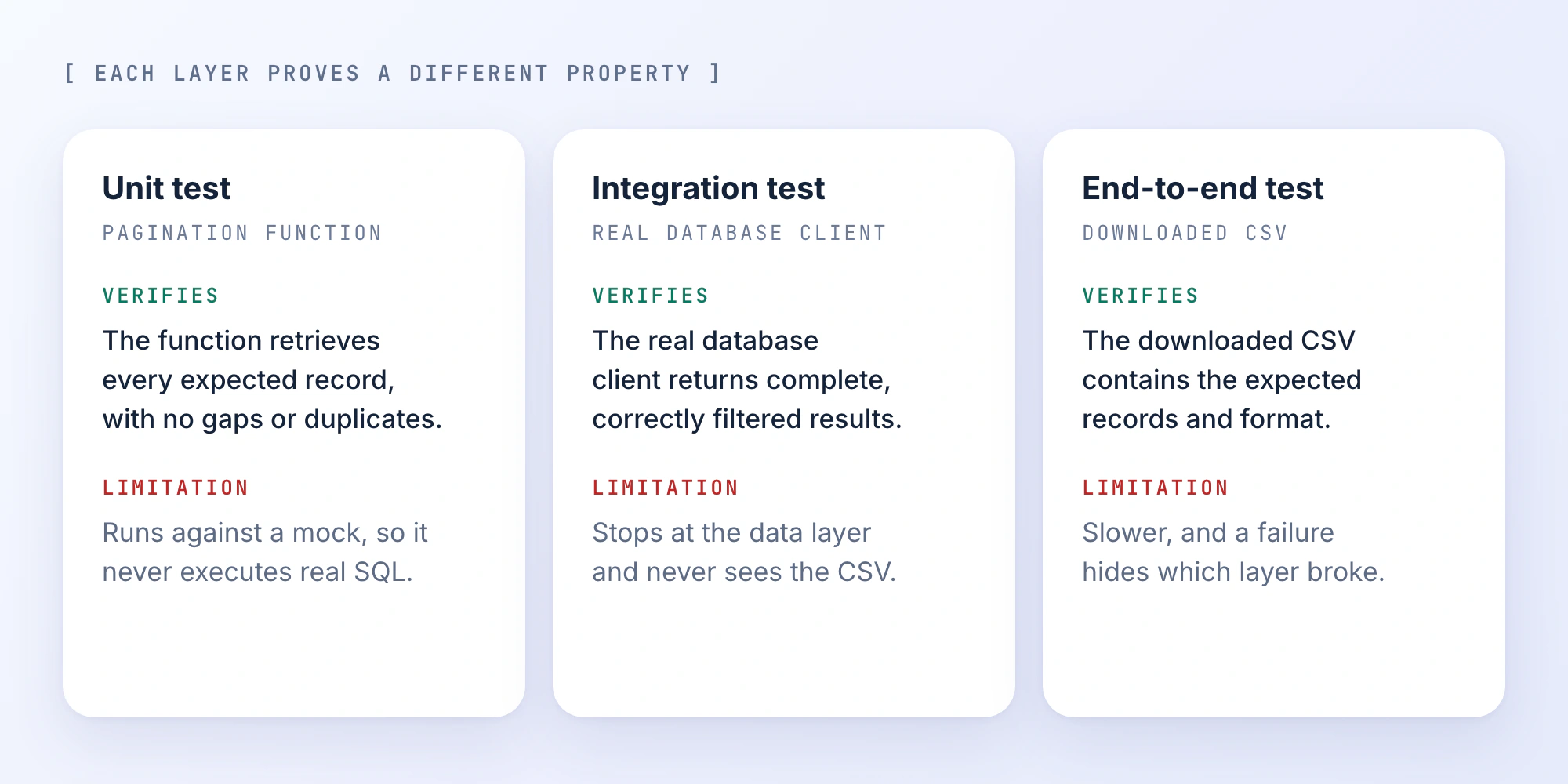
When evaluating a fix, separate what each test establishes.
| Verification Layer | What It Can Establish |
|---|---|
| Unit test | The targeted function behaves correctly for specific inputs |
| Integration test | The function works with real dependencies and data |
| End-to-end test | The user-facing workflow produces the expected result |
| Regression suite | Previously covered behavior hasn't broken |
None of these layers alone proves universal correctness.
Together, they provide stronger evidence, especially when the test inputs include the original production failure.
This is also where AI-assisted development benefits from independent review.
Keep the Coding Agent in Investigation Mode
AI coding agents can help trace call paths, inspect diffs, search the repository, run tests, and identify inconsistencies between implementations and requirements.
The problem starts when the agent treats its first hypothesis as an established diagnosis.
Rather than opening with "fix this bug," separate investigation from implementation.
A useful diagnostic prompt looks like this:
Investigate this failure without modifying files.

Observed behavior:
[What happened]

Expected behavior:
[What should happen]

Reproduction:
[Input, environment, and steps]

Relevant change:
[Commit or PR]

Tasks:
1. Trace the affected execution path.
2. Identify the first incorrect result.
3. List the most likely root causes.
4. Provide code or runtime evidence for each.
5. Suggest a check that could disprove each hypothesis.

Do not patch files or update tests yet.
Report anything you could not verify.
Once you've confirmed the cause, move to a constrained patch.
Specify which files may change, which interfaces must remain compatible, and which tests should demonstrate the fix.
Require the agent to report failed commands and tests rather than silently retrying or weakening checks.
Know When to Stop the Patch Loop
A coding agent can get stuck cycling through plausible but unsupported fixes.
One change fails. It rewrites another component. The same failure persists. It adjusts the tests. Eventually the diff becomes larger than the original feature.
At that point, stop generating patches.
Restore a known reproducible state without discarding unrelated work. Re-examine the latest evidence and ask which observation would distinguish the remaining hypotheses.
Sometimes the next useful action is a database query, breakpoint, or request trace rather than another code edit.
If the same hypothesis has failed repeatedly, the investigation needs new evidence.
When the Bug Only Happens in Production
Some failures won't reproduce in a local development environment, even when the relevant source code is identical.
The difference may be in runtime configuration, deployment state, traffic, or data.
Check the deployed commit and runtime version first. Then compare relevant environment variables, feature flags, dependency versions, database migrations, and service permissions.
For intermittent issues, look for patterns tied to concurrency, request timing, retries, and shared resources.
A race condition might never appear with a single local request but surface under concurrent production traffic.
Likewise, a query may work with a small development database and fail under production data volume, stricter timeouts, or different indexes.
Use logs and distributed traces to follow a request through the system. Where possible, create a sanitized, production-like fixture that preserves the conditions responsible for the failure.
If the regression is actively affecting users, consider rollback, feature-flag isolation, or another containment measure before attempting a substantial repair.
A successful local test is not sufficient evidence for a production-only bug. Verify the patched behavior in an environment that reproduces the original conditions.
When to Patch, Revert, or Rewrite
Not every generated implementation is worth rescuing.
A localized defect with a confirmed cause is usually a good candidate for a narrow patch.
If a recent change introduces a serious regression across multiple services, reverting it may be safer while the team investigates.
A rewrite becomes reasonable when the implementation repeatedly violates its contract, relies on incorrect architectural assumptions, or is more expensive to verify than to replace.
Avoid treating the amount of generated code as a reason to preserve it.
The decision should depend on the scope of the defect, confidence in the diagnosis, regression risk, and time required to recover safely.
For defects that span multiple services, it also helps to separate containment from the permanent fix. Restoring a working production state and repairing the underlying implementation don't always need to happen in the same deployment.
Debugging Across Tools With PandaOS
Some bugs can be resolved entirely inside an editor. Others require moving between a user report, repository, database, terminal, running application, and deployment logs.
PandaOS brings those work surfaces together in a local AI workstation, allowing developers and AI agents to investigate issues without manually transferring context between disconnected tools.
Its Bug Report to Verified Deploy workflow illustrates that process: start with the reported issue, inspect the code and connected systems, run checks, verify the application in the browser, and follow the existing deployment process.
Keeping the investigation connected makes the workflow easier to manage. It doesn't replace the need to confirm the root cause, inspect the patch, and verify the resulting behavior.
Final Checks Before Merging an AI-Generated Fix
Before merging, inspect the complete diff and confirm that the change addresses the original failure.
The PR should establish what caused the defect, what behavior changed, and which checks support the fix.
Look for unrelated file modifications, removed assertions, changed fixtures, and new dependencies that weren't necessary for the repair.
Run the regression test against the affected behavior, review adjacent functionality, and verify the actual workflow when the defect crosses system boundaries.
If any checks were skipped or couldn't run, record that limitation explicitly.
The useful standard isn't whether the agent says the bug is fixed. It's whether the evidence shows that the original failure no longer occurs without breaking the behavior around it.
FAQ
Can you debug AI-generated code without the original agent conversation?
Yes. The repository, commit history, runtime behavior, tests, and application requirements are more important than the original chat transcript.
Start from a known failing state and inspect the changes associated with the feature. The agent transcript may explain why a decision was made, but it isn't required to determine whether the implementation is correct.
How do you tell a flaky test from an actual application bug?
Run the failing test repeatedly under controlled conditions and inspect differences between runs.
Check shared state, asynchronous operations, time dependencies, test order, and external services. A test that fails intermittently may reflect a test-harness problem or a genuine race condition in application code.
Don't mark a failure as flaky simply because it disappears on retry.
Can an AI coding agent review its own fix?
It can run checks, inspect its diff, and identify potential problems, but its assessment shouldn't be treated as independent verification.
The agent may carry forward the same assumptions that caused the defect. A separate reviewer, stronger regression tests, or an independently defined acceptance test can help expose those gaps.
For consequential changes, preserve a clear review boundary between generating the patch and approving it.
What should you do when an AI coding agent keeps failing to fix a bug?
Stop asking it for more patches. Repeated attempts often grow the diff without changing the outcome.
Return to a known reproducible state and review the evidence you have. Then collect the observation that would rule out one of the remaining hypotheses, such as a database query, a breakpoint, or a request trace.
When should you revert AI-generated code instead of patching it?
Revert when a recent change causes a serious regression across multiple services and the cause isn't confirmed yet. Restoring a working state comes first, and the permanent fix can ship in a later deployment.
A narrow patch fits a localized defect with a confirmed cause. Consider a rewrite when the implementation repeatedly breaks its contract or costs more to verify than to replace.