

AI coding used to be mostly predictive: write part of a function and get the next few lines. Then it became conversational: describe a problem, provide some context, and get an answer.
Coding agents change the loop again.
Instead of waiting for you to manually carry each suggestion into the codebase, an agent can inspect a repo, decide what information it needs, edit files, run commands, observe the result, and continue working toward a goal.
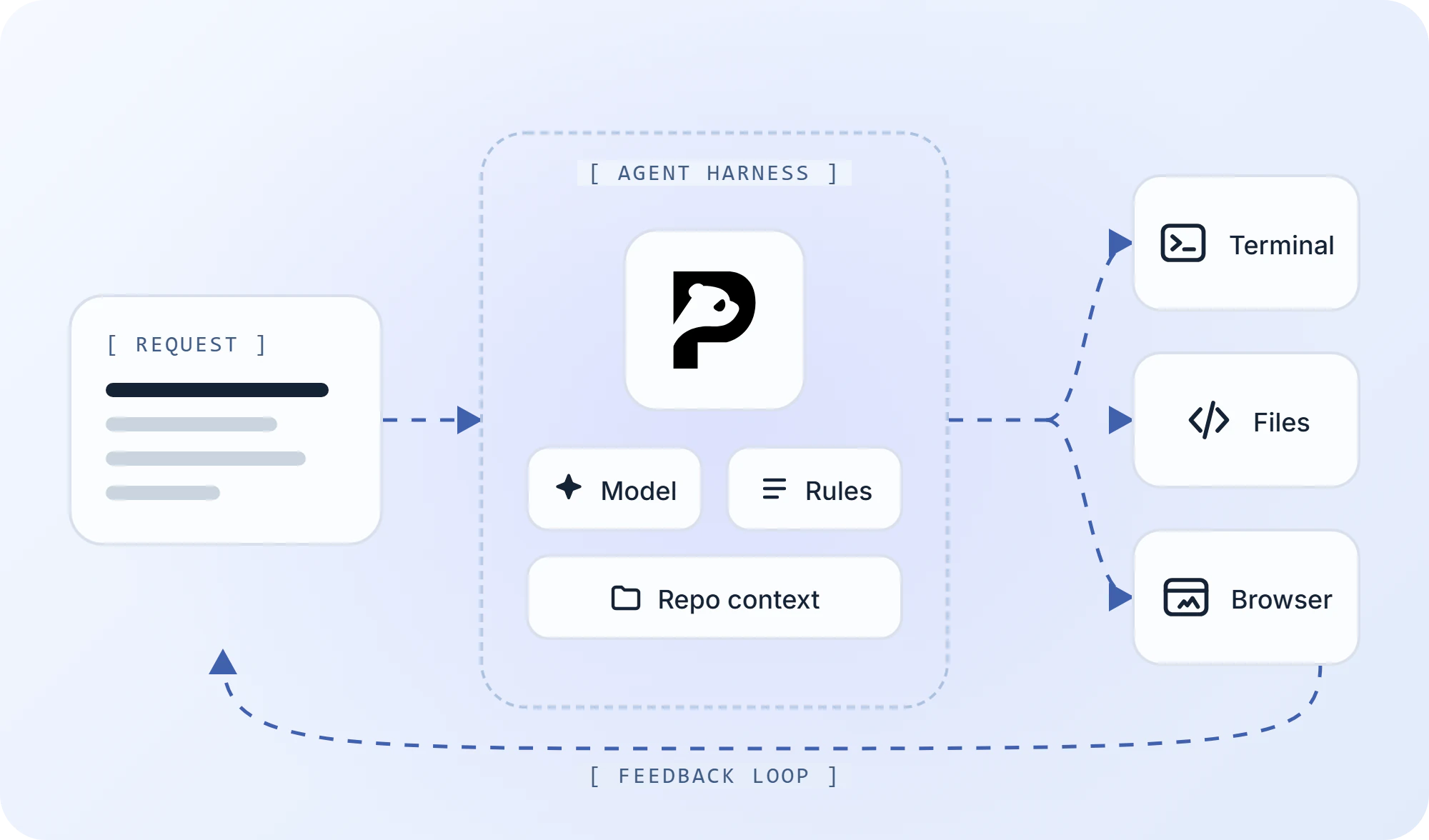
The important part is that the model is only one component.
Current agent systems increasingly make this explicit. Cursor describes Agent as a combination of instructions, tools, and the selected model. OpenAI separates the agent harness from the environment where commands and code actually run. GitHub Copilot Agent Mode combines model reasoning with file edits, terminal commands, tools, iteration, and approval controls.
Understanding that architecture helps explain why two coding agents using similarly capable models can behave very differently on the same engineering task.
TL;DR
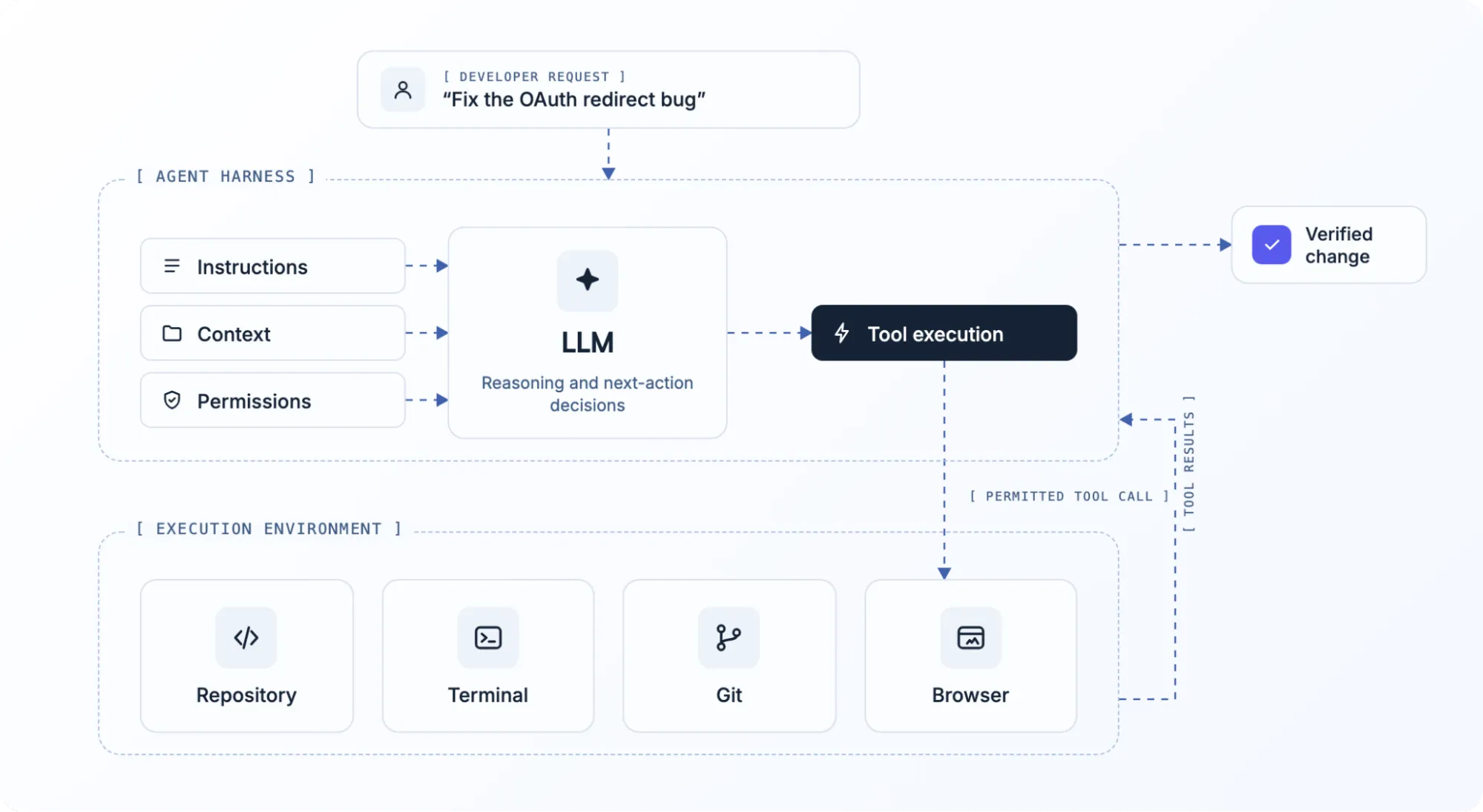
An AI coding agent is a system that gives an AI model enough context, tools, permissions, and execution access to work toward a software-development goal rather than simply return an answer.
A typical agent may be able to:
- inspect a repo
- find relevant files
- edit code
- run terminal commands
- execute tests
- inspect failures
- use external tools
- revise its approach
- return a diff, commit, PR, or verified result
The model provides reasoning and generation.
The agent harness manages what happens around it: which instructions and context reach the model, which tools it can call, where those tools execute, what requires approval, and how results feed into the next step. OpenAI describes this surrounding execution system as the reusable agent loop rather than simply a prompt wrapped around a model.
What Is an AI Coding Agent?
A coding agent is closer to an execution system than a smarter autocomplete. It can decide what to inspect, take actions through tools, observe the result, and continue working toward a development goal.
A traditional coding assistant usually leaves the developer in control of every step.
You ask a question. It answers. You highlight code. It proposes an edit. You apply it. You run the test.
An agent can own more of that sequence.
Give it:
Fix the OAuth redirect loop that started after yesterday’s auth changes.
A capable agent might decide that it needs to:
- inspect the auth code
- examine the recent diff
- find the callback route
- search redirect logic
- run the relevant tests
- modify the implementation
- rerun validation
- return the change for review
GitHub describes Agent Mode in similar terms: it receives a high-level task, decides which files to modify, makes edits, runs commands, and iterates when needed. Cursor likewise documents repo search, multi-file editing, shell execution, and verification as agent capabilities.
That ability to act, observe, and iterate is the useful dividing line.
Inside the Agent Stack
The model gets most of the attention, but the surrounding system determines what the model can actually do. A practical coding agent usually combines several layers during a task.
The Model
The model is the reasoning and generation engine.
It can interpret the task, reason about code, propose an approach, generate changes, interpret errors, and decide what it wants to do next.
But the model does not inherently have your repo, terminal, browser, Git history, test runner, or credentials.
Those capabilities have to come from the surrounding agent system.
This is why saying two agents “use the same model” tells you surprisingly little about whether they will behave the same way.
Instructions and the Harness
The harness is the orchestration layer around the model.
It can manage:
- system instructions
- project rules
- tool definitions
- context assembly
- session state
- approvals
- retries
- compaction
- subagents
- progress and recovery
Cursor exposes this idea directly through its three Agent components: instructions, tools, and model. OpenAI defines the harness as the layer running the model-and-tool loop while maintaining the agent session.
Harness design matters because two products can give the same model very different:
- instructions
- retrieval strategies
- tool sets
- permission boundaries
- environments
- retry behavior
Those differences can materially change the result.
Codebase Context
Before an agent can change the right code, it needs to find the right code.
A production repo may contain:
- thousands of files
- several packages
- generated code
- migrations
- tests
- infrastructure
- configs
- duplicated patterns
The entire repository usually cannot simply sit inside the model’s active context at once.
Instead, agents build a working context by exploring the codebase and pulling in the pieces that appear relevant.
That may involve:
- directory inspection
- filename and symbol search
- grep
- dependency tracing
- Git history
- project rules
- previous session context
- indexed or semantic retrieval
The objective is not to show the model everything.
It is to surface the right information at the point where the model needs it.
Tools
Tools let the model act on the environment instead of only reasoning about it.
Common tools include:
- file read/write
- code search
- terminal
- Git
- browser
- test runner
- web search
- MCP servers
- databases
- external APIs
A model might conclude:
I need to know whether this migration has already run.
Without a tool, it can tell you how to check.
With the right database or terminal access, the agent may be able to check directly.
Model Context Protocol is one way agent hosts can expose additional capabilities. MCP defines standardized primitives including tools, resources, and prompts, allowing compatible hosts to connect agents to external systems without inventing a completely separate integration model for each one.
Execution Environment
A tool call still needs somewhere to run.
That might be:
- your local machine
- a restricted workspace
- a container
- a sandbox
- a remote dev environment
- a cloud VM
OpenAI’s agent architecture explicitly separates the harness from the environment. The harness manages the agent loop; the environment provides compute, commands, and files.
That distinction becomes important once agents start doing more than editing text.
Feedback
Finally, the agent needs the result of its own actions.
A useful loop looks more like
Plan→Act→Observe→Adjust→Act Again
Rather than
Prompt→Answer
If a test fails, the error becomes new evidence. If a build succeeds, the agent can move to the next check. If a browser still reproduces the bug, the agent knows the patch was incomplete.
That feedback loop is what allows the system to make progress through tasks that cannot be solved correctly in a single response.
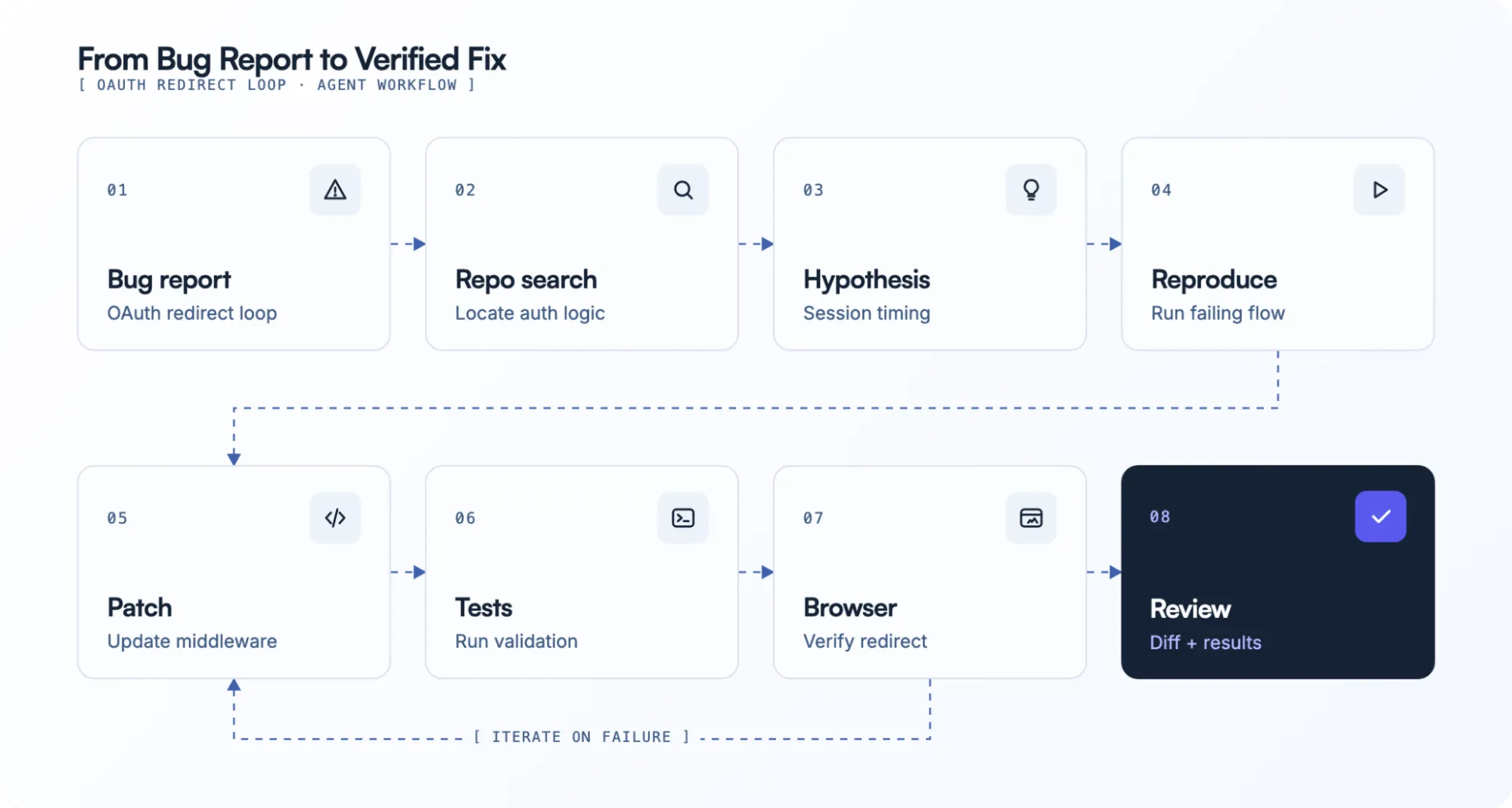
From Prompt to Patch: A Real Agent Loop
The easiest way to understand the architecture is to follow one issue from request to review.
Imagine the developer asks:
OAuth users are getting sent back to
/loginafter the callback. Find the regression, fix it, and verify the auth flow.
01 Interpret the Goal
The agent first translates the request into an actionable problem.
It may need to determine:
- which auth provider is involved
- where callbacks are handled
- whether this is code, config, or data
- how a successful fix can be verified
A clear request narrows the search space.
02 Explore the Repo
Next, it starts locating the relevant code.
It might inspect
app/auth/middleware.tslib/session.tsauth.config.tsThen search for
callbackredirectsessionloginoauthIf the developer said the problem started yesterday, recent Git history may be useful too.
The model is not reasoning over the entire repository simultaneously. It is progressively building a smaller working set.
03 Form a Hypothesis
Suppose the agent discovers that middleware now checks for a session cookie before the OAuth callback has finished persisting it.
Its hypothesis becomes:
Authentication succeeds, but middleware redirects before the new session is available.
That hypothesis determines what it needs to test.
04 Reproduce the Failure
Before changing the code, the agent may run the relevant test or application.
pnpm test author:
pnpm devIf browser access is available, it might also reproduce the actual redirect path.
Runtime evidence matters because reading code and observing the system are different sources of information.
05 Patch the Implementation
Once the hypothesis is strong enough, the agent edits the relevant files.
That might mean:
- changing middleware conditions
- adjusting session handling
- fixing redirect logic
- adding a regression test
A good agent should keep the patch scoped to the problem rather than refactoring unrelated code because it happened to notice it.
06 Run Verification
After the change:
pnpm test auth
pnpm lint
pnpm typecheck
If the issue affects runtime behavior, the agent may also need to verify the login flow in a browser.
07 React to New Evidence
Suppose the test passes but the browser still redirects.
The agent should not declare success.
It now has contradictory evidence and needs to inspect things such as:
- cookies
- network requests
- runtime logs
- environment-specific behavior
The output of one tool becomes the input to the next reasoning step.
08 Return Something Reviewable
A useful end state is not simply:
Fixed.
It is evidence:
- files changed
- diff
- tests run
- results
- remaining caveats
- commit or PR
- browser verification
Agentic coding changes who performs the intermediate steps. It does not remove the need to know what actually changed.
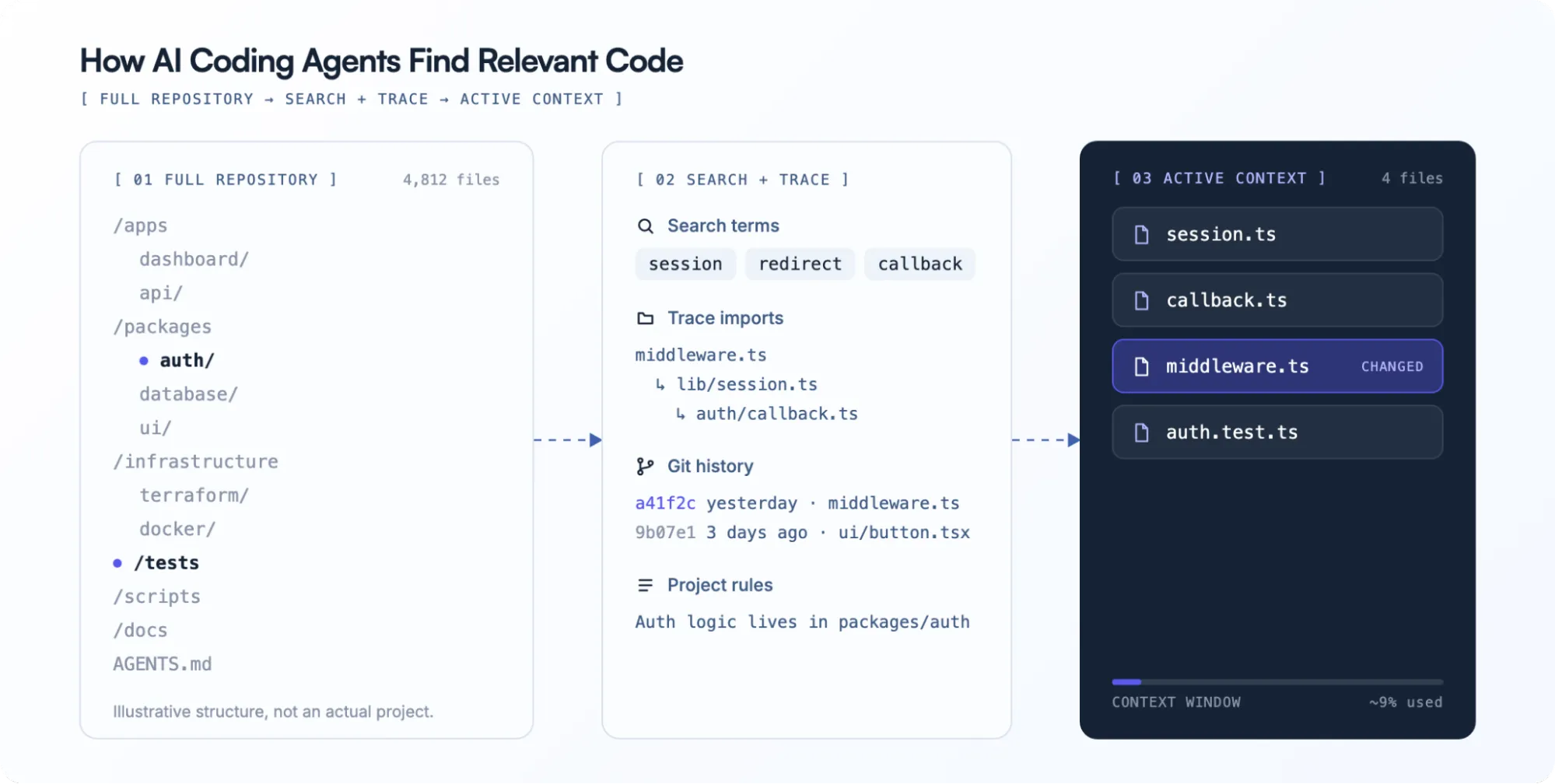
How Agents Find the Right Code in a Large Repo
Context retrieval is one of the least visible parts of agentic coding, but it often determines whether the agent solves the real problem or confidently edits the wrong file.
Imagine a monorepo:
/apps
  /dashboard
  /api
/packages
  /auth
  /database
  /ui
/infrastructure
/tests
Now give the agent:
Fix the session timeout bug.
The symptom alone does not reveal whether the failure sits in:
- frontend state
- middleware
- token refresh
- backend session storage
- database expiry
- infrastructure config
The agent has to narrow the search.
A typical path might look like:
- Request
- Search symbols and filenames
- Inspect likely modules
- Trace imports and dependencies
- Run targeted searches
- Pull relevant files into context
- Use test or runtime evidence to refine further
This is why repository instructions can be so valuable.
A project-specific instruction file might tell the agent:
Auth logic lives in packages/auth.
Integration tests live in tests/auth.
Run pnpm test:auth before changing session behavior.
Do not edit generated Prisma files directly.
Those four lines can prevent a significant amount of blind exploration.
Context quality therefore depends on more than the model’s context-window size. Retrieval, repo structure, project rules, and the ability to gather evidence all affect what the model actually sees.
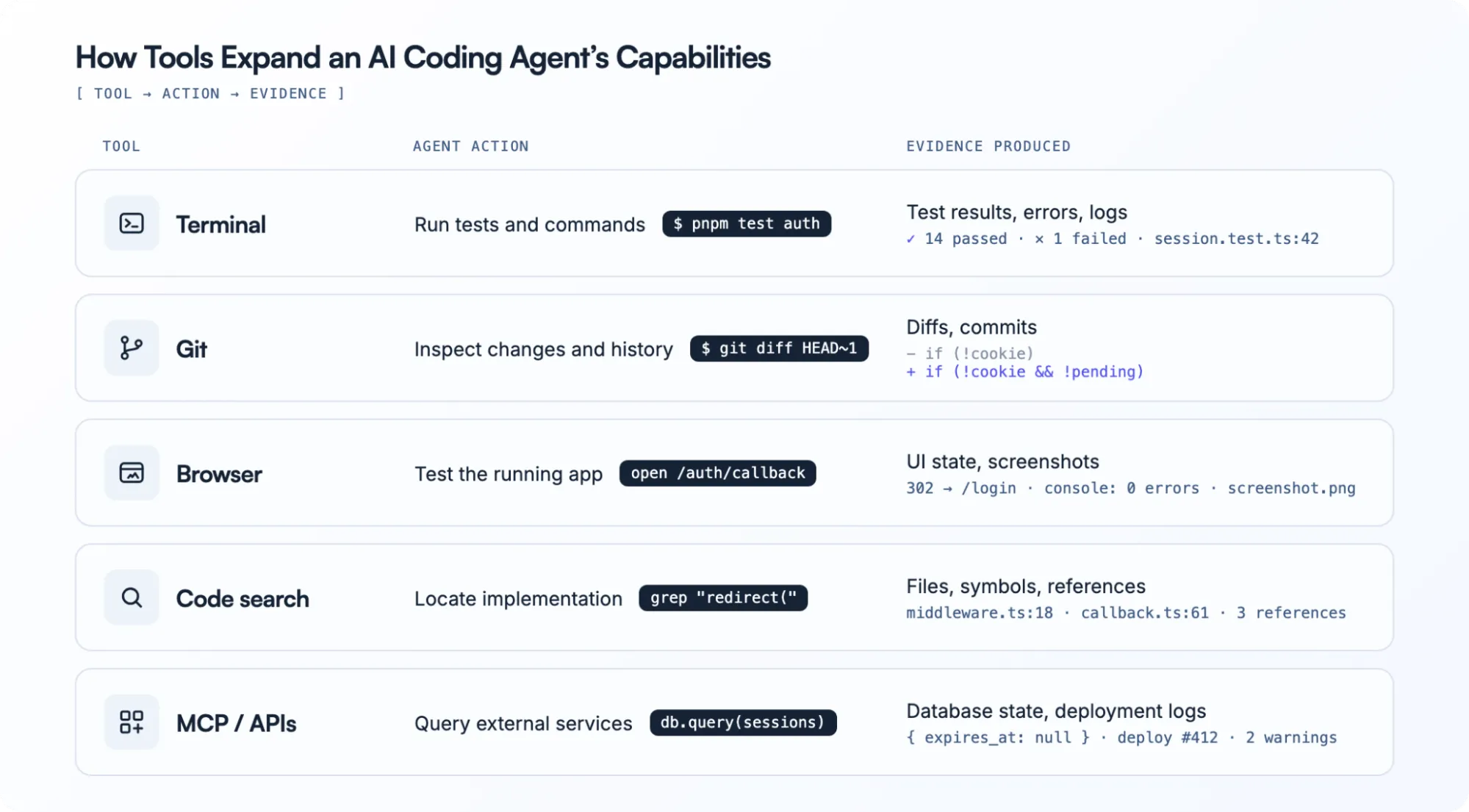
How Tools Expand the Agent’s Reach
A model can reason about the information already in front of it. Tools let the agent go and produce new information.
Terminal
Terminal access turns many suggestions into actions.
The agent can run:
- builds
- tests
- scripts
- linters
- type checks
- package managers
- local servers
- Git commands
That changes:
“This should work.”
into something closer to:
“The project builds, the targeted test passes, and the previous failure no longer reproduces.”
Git
Git helps an agent understand both history and its own changes.
Useful questions include:
- What changed recently?
- Which files changed together?
- Is this regression new?
- What does the current diff contain?
- Is the patch touching more than intended?
It also creates a clean review boundary between agent output and accepted code.
Browser
Some bugs only exist when the application is running.
Browser access can let an agent:
- open the app
- navigate routes
- interact with UI elements
- inspect rendered state
- capture screenshots
- check console output
- verify visual changes
Cursor, for example, currently documents browser tools for application testing and visual verification.
External Systems
Real development tasks also cross systems outside the codebase.
An investigation may require:
- deployment logs
- database state
- GitHub issues
- cloud services
- internal APIs
- documentation
MCP is one mechanism for exposing these external capabilities to compatible agent hosts. In the protocol, tools are model-callable actions, resources can supply contextual data, and prompts expose reusable user-invoked templates.
More tool access does not automatically make an agent better.
It makes the permission and verification model more important.
Coding Agent vs Coding Assistant
The boundary is less clean than it used to be because many products now support both conversational assistance and agent modes.
The distinction is still useful.
| Coding Assistant | Coding Agent | |
|---|---|---|
| Primary job | Help the developer | Work toward a goal |
| Typical scope | Question, snippet, file | Multi-file, multi-step task |
| Repo exploration | Mostly user-led | Agent can initiate |
| File changes | Suggested or scoped | Coordinated across files |
| Terminal use | Limited or manual | Often part of the loop |
| Tool selection | User-directed | Agent can decide |
| Iteration | Developer drives it | Agent can react to results |
| Autonomy | Low | Medium to high |
| Human role | Drives each step | Sets boundaries and reviews |
The practical difference is often who owns the next step.
With an assistant
You ask→it responds→you decide what happens next
With an agent
You give it a goal→it chooses intermediate actions→you supervise the boundaries and review the result
GitHub’s Agent Mode follows that latter pattern: Copilot determines which files need changes, proposes and executes commands where permitted, and iterates until the task is complete.
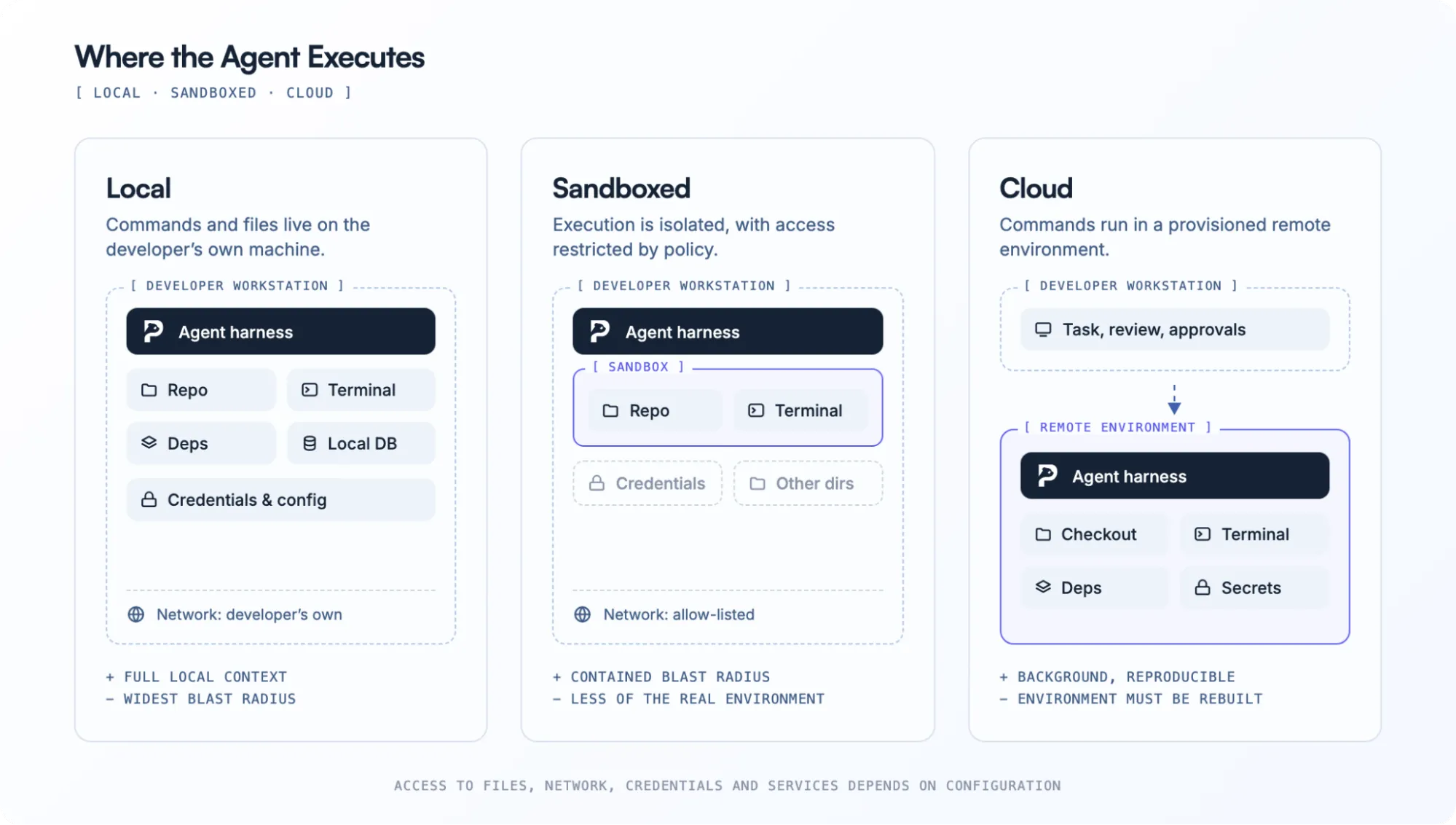
Where Does the Agent Actually Run?
“Coding agent” describes behavior, not deployment architecture. Where execution happens changes what the agent can access, how reproducible its work is, and how much risk comes with autonomy.
Local
A locally operating agent can work against the environment already on your machine.
That can mean immediate access to:
- the current checkout
- installed dependencies
- local services
- existing config
- development databases
The downside is obvious: more local access means more potential impact from a bad command.
Sandboxed
A sandbox can constrain the environment the agent is allowed to modify.
Depending on the system, boundaries may cover:
- filesystem paths
- shell operations
- network access
- credentials
- external directories
This gives the agent enough room to act without automatically giving it everything the developer can access.
Cloud
Cloud agents work in separate remote environments.
That makes it possible for a task to continue without relying on the developer’s active workstation.
The challenge shifts toward reproducing enough of the real environment:
- dependencies
- startup scripts
- environment variables
- services
- network access
- secrets
OpenAI’s current Agents architecture supports hosted or self-hosted environments, while the harness remains responsible for session state and the model/tool loop.
There is no universally best execution model.
The right one depends on whether the task values immediate local context, isolation, background execution, or reproducibility.
Permissions Define How Autonomous the Agent Is
Autonomy is not a single switch.
An agent might be allowed to:
- read files automatically
- search the repo automatically
- run tests automatically
- ask before installing packages
- ask before editing external files
- deny production deploy commands entirely
That is much more useful than thinking in terms of either “manual” or “fully autonomous.”
GitHub Copilot Agent Mode asks for approval before terminal commands by default unless configuration allows otherwise. OpenCode exposes granular allow, ask, and deny permissions across operations such as file reads, edits, shell commands, external directories, web access, and subagent launches.
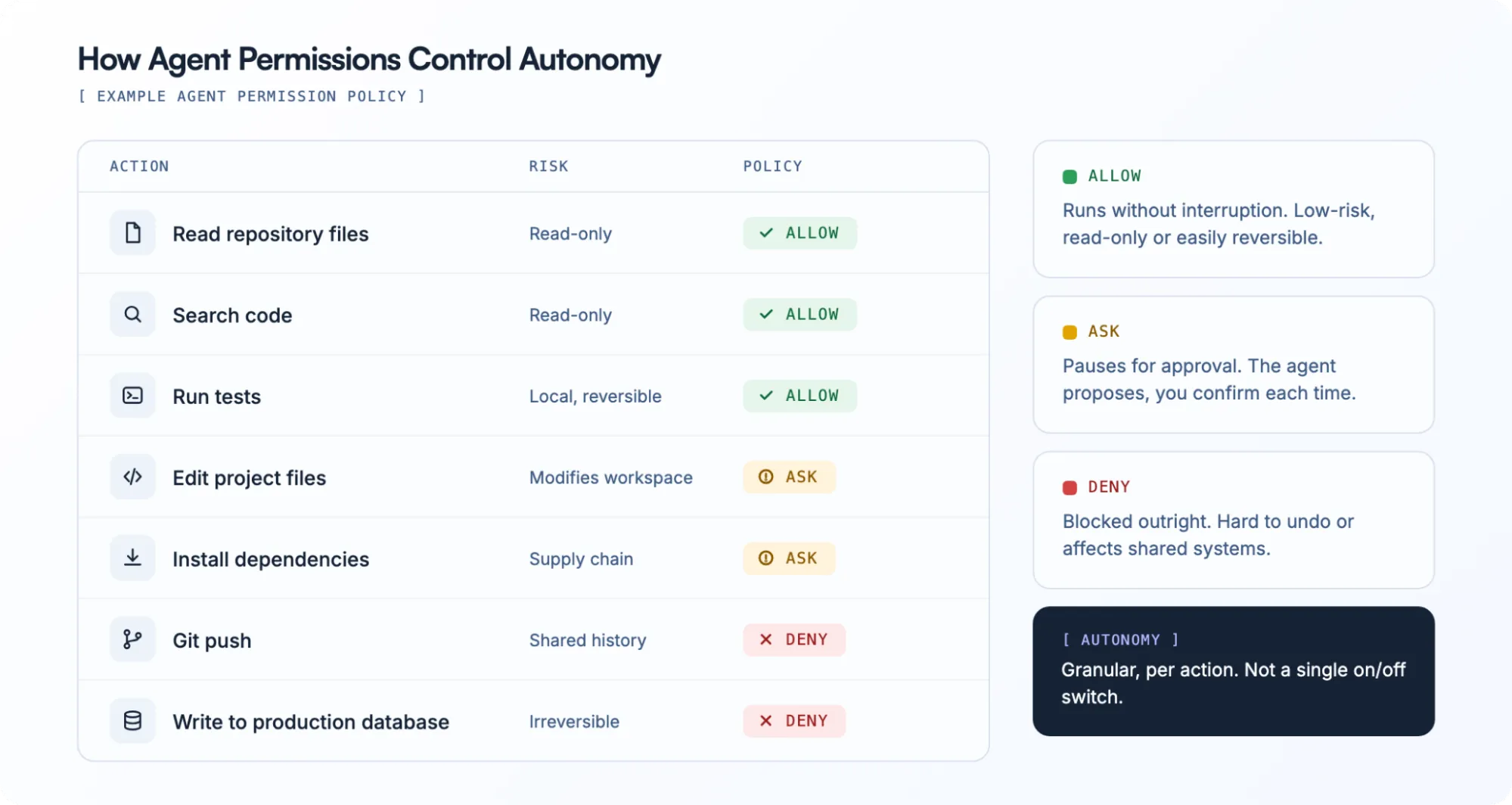
The correct level of autonomy depends on the blast radius of the task.
The more systems the agent can touch, the more important those boundaries become.
Where AI Coding Agents Still Break Down
Longer agent loops create failure modes that autocomplete never had to deal with. A wrong assumption early in the task can propagate through several technically valid actions before anyone notices.
Missing Context
The agent can only reason from what it finds or receives.
If the critical requirement exists in:
- an undocumented team convention
- another repo
- a Slack thread
- a production dashboard
- someone’s head
the implementation can be internally coherent and still wrong.
Weak Verification
A passing test is evidence, not proof that the whole feature works.
Real validation may require a combination of:
- unit tests
- integration tests
- type checks
- browser flows
- deployment checks
- real data
If none of those signals exist, the agent has a harder time catching its own mistakes.
Ambiguous Requirements
Agents are much better at implementing a clear target than deciding what the product should do.
Make onboarding better.
is not an engineering specification.
A model may fill the gap with plausible assumptions and produce a polished solution to the wrong problem.
Context Drift
Long sessions accumulate code, tool results, errors, previous hypotheses, and instructions.
Agent systems therefore need ways to decide what remains important.
OpenAI’s managed agent infrastructure includes automatic context compaction, while OpenCode exposes automatic session compaction and a dedicated compaction agent for long-running context.
False Completion
One of the most dangerous outputs is:
Done.
when the task is only partially done.
A better agent workflow ends in evidence:
- a diff
- passing checks
- logs
- screenshots
- browser state
- a PR
- human review
The more autonomous the loop becomes, the more important the proof of completion becomes too.
How to Evaluate an AI Coding Agent
Once you understand the stack, evaluation becomes much more concrete. Instead of asking only which model an agent uses, ask whether the whole system supports the work you actually want to hand off.
Can It Navigate Your Repo?
Look at:
- code search
- monorepo handling
- project rules
- cross-file context
- dependency tracing
- history and previous context
If it consistently starts in the wrong place, better generation will not fix the workflow.
Can It Use the Tools Your Tasks Need?
A backend migration and a frontend regression need different evidence.
Consider whether you need:
- terminal
- browser
- Git
- MCP
- database access
- external APIs
- deployment tools
Do not optimize for the longest tool list. Optimize for the tools your real tasks require.
Where Does It Execute?
Ask whether you want:
- local access
- isolation
- background execution
- reproducible remote environments
- several modes for different tasks
Execution architecture changes both capability and risk.
How Much Control Do You Keep?
Useful controls include:
- approvals
- plans
- read-only modes
- checkpoints
- diffs
- interruption
- rollback
- granular permissions
A good system should make it easy to increase autonomy deliberately.
Can You Change Models?
Some agents center on one provider.
Others expose:
- multiple hosted models
- BYOK
- local models
- provider switching
Model choice matters more if your team already uses different models for different work.
What Happens to Project Context?
Finally, look beyond the current chat.
Does useful knowledge about the project survive?
For example:
- repo structure
- important commands
- team conventions
- connected tools
- previous work
- recurring workflows
As agents take on larger chunks of the development lifecycle, continuity outside one session becomes increasingly valuable.
Where PandaOS Fits Around the Agent Layer
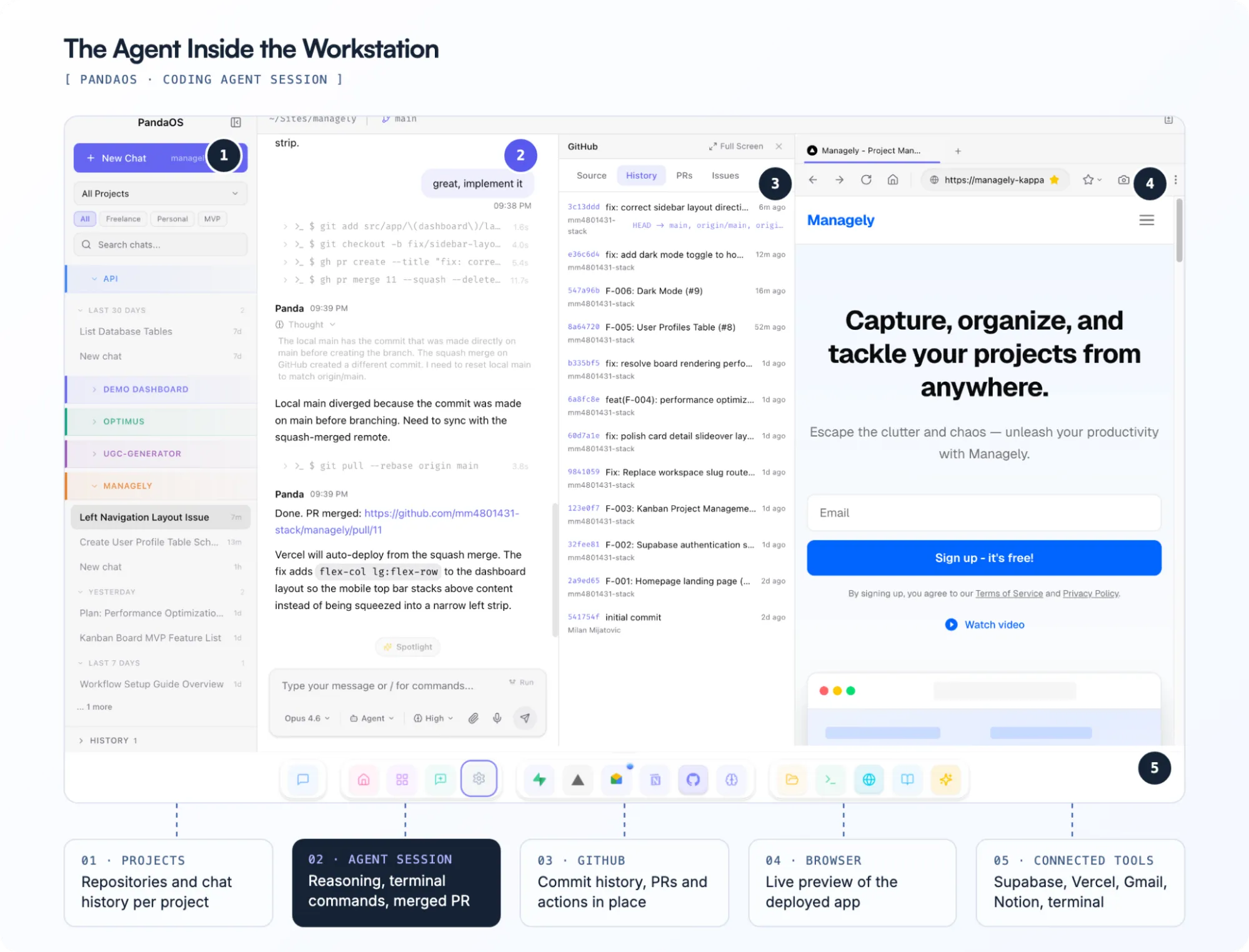
PandaOS is not another AI coding agent. It is the local workstation around the agent layer.
The coding agent can handle implementation, while the wider development environment still includes:
- projects and repos
- terminal sessions
- browser state
- model connections
- deployment systems
- databases
- connected apps
- project knowledge
PandaOS is designed to keep those pieces available in one working environment rather than making the entire setup revolve around a single agent.
That means a workflow can move from:
- Issue or request
- Relevant project
- Agent investigation
- Terminal / browser / connected data
- Code change
- Deployment or verification
without treating each system as a completely separate session.
Supported agents and model connections can be chosen based on the task, while projects and surrounding tool state remain in the workstation.
That is the distinction between the agent doing the coding work and the environment that keeps the rest of the work together.
The Model Is Only One Part of the Agent
The jump from coding assistant to coding agent is not simply a better LLM.
It is the combination of context, harness, tools, execution, permissions, and feedback that lets the model move from answering a coding question to working through a development task.
Once you understand those layers, comparing coding agents becomes much easier.
The question is no longer only:
Which model writes the best code?
It becomes:
Which agent has the right environment, tools, context, and control for the work I want to hand off?
FAQ
Do AI coding agents need access to the entire repository?
Not necessarily.
An agent needs enough access to locate the code and relationships relevant to the task. Good retrieval and project instructions can reduce how much of the repository needs to be present in the active model context at once.
Can AI coding agents run completely locally?
Yes, depending on the system.
“Local” can refer separately to the agent harness, execution environment, and model. An agent may operate on a local repo while still calling a cloud model, or it may use a locally hosted model as well.
How does an agent decide which files to edit?
It generally combines the developer’s request with codebase exploration.
That can involve filenames, symbol search, grep, imports, project instructions, Git history, indexed retrieval, and evidence from tests or runtime behavior.
Can AI coding agents use a browser?
Some can.
Browser access can help an agent reproduce frontend issues, interact with a running application, inspect runtime behavior, capture screenshots, or verify that a UI change works.
What is an agent harness?
The harness is the execution system around the model.
It manages elements such as instructions, context, tool calls, session state, approvals, execution loops, recovery, and how tool results are passed back to the model.
Do coding agents need MCP?
No.
An agent can operate entirely with built-in tools. MCP becomes useful when a host wants a standardized way to expose additional tools, resources, or services to the model.
How much autonomy should I give a coding agent?
Start with the minimum needed for the task.
Reading code and running tests have a different risk profile from installing software, changing infrastructure, writing to production databases, or pushing code. Increase autonomy only where the permission boundaries and review process support it.
Are coding agents replacing IDEs?
Not necessarily.
Some agents live inside traditional IDEs, some operate through terminals, some use agent-native editors, and others run in remote environments. The agent and the interface around it are increasingly separate choices.