

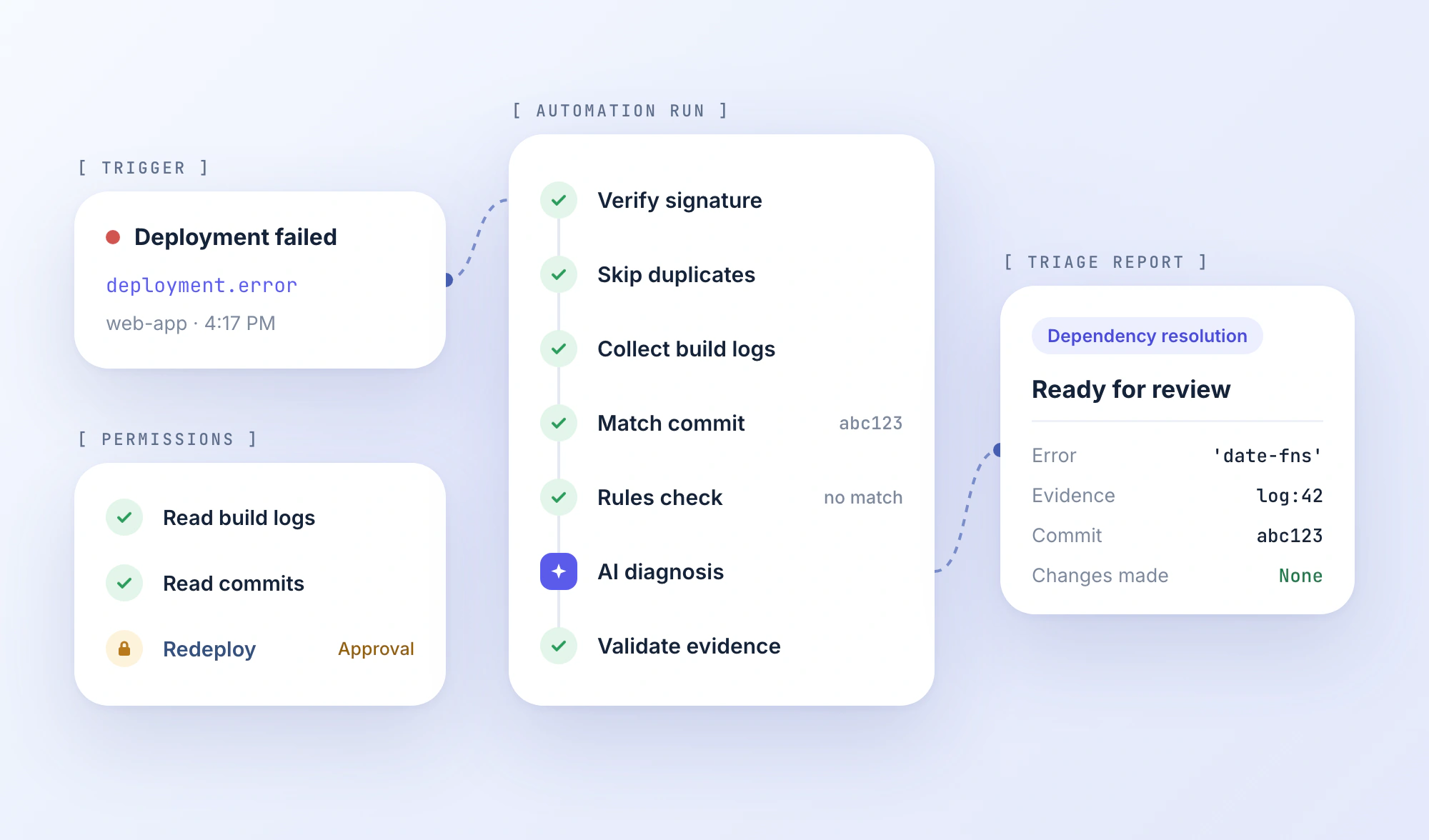
A build fails at 4:17 PM.
The CI pipeline has already done its job: the build stopped, the error was recorded, and the deployment never reached production.
Now the manual work begins.
Someone has to read the logs, identify the relevant commit, check what changed, determine whether the failure is reproducible, and decide who needs to act.
None of those steps is particularly difficult on its own. But the investigation crosses multiple tools, and most of the information gathering happens the same way every time.
That's the part worth automating.
Developer workflow automation connects development tasks into repeatable processes, using scripts and CI/CD pipelines for predictable operations and AI for steps that require interpretation or investigation.
The challenge isn't making an AI agent execute a sequence of commands. It's designing a workflow that remains useful when logs are missing, integrations fail, or the model reaches the wrong conclusion.
We'll use one deployment-failure investigation to work through those decisions, from identifying the automation opportunity to defining its boundaries, handling errors, and measuring whether it actually saves engineering time.
TL;DR
- Developer workflow automation goes beyond CI/CD. It connects tasks across repositories, build systems, deployments, and other tools to reduce repetitive manual work.
- Not every step needs an AI agent. Use scripts for predictable operations, AI for interpreting variable inputs, and human approval for high-risk decisions.
- Design workflows around clear boundaries. Define triggers, inputs, permissions, expected outputs, and failure handling before writing prompts or connecting tools.
- Reliability matters more than autonomy. Validate AI outputs, handle duplicate events and failed integrations, and test workflows against realistic failure scenarios.
- Measure useful outcomes, not completed runs. Track time saved, accepted outputs, corrections, and execution costs to determine whether automation actually improves development work.
Start With the Handoffs, Not the Tools
Developers already automate plenty of work.
Tests run when code is pushed. CI systems build artifacts. Deployment platforms publish applications. Infrastructure tools manage environments.
Yet a successful automated step often leaves another task waiting for a human.
A failed deployment illustrates the gap. CI can tell you that the build failed, but someone still needs to connect the failure to relevant repository changes, interpret the logs, and prepare the next action.
That's where developer workflow automation becomes valuable: not necessarily replacing existing tools, but connecting what happens between them.
Identify the Work That Repeats
Before choosing an automation platform, document a process that developers regularly perform.
For our deployment example, the manual sequence might be:
- Receive a failed-deployment notification.
- Open the deployment and inspect build logs.
- Identify the exact commit associated with that deployment.
- Check relevant repository changes.
- Determine the likely failure category.
- Prepare a summary with evidence and suggested checks.
The workflow has a recognizable trigger, a repeatable information-gathering process, and a useful output.
That makes it a stronger automation candidate than a vague objective such as "automate debugging."
Frequency matters too. A process that consumes five minutes every day may be worth automating before one that takes an hour twice a year.
But don't evaluate candidates using time alone.
| Factor | What to evaluate |
|---|---|
| Frequency | How often does the task occur? |
| Manual effort | How much active developer time does it require? |
| Consistency | Can inputs, actions, and outcomes be clearly defined? |
| Verification | Can someone objectively check the result? |
| Risk | What happens when the workflow makes a mistake? |
For an initial AI workflow, favor tasks with well-defined outputs and limited consequences.
Summarizing failed builds, enriching bug reports, and preparing repository activity summaries are reasonable candidates.
Automatically modifying production infrastructure based on an AI diagnosis requires considerably stronger controls.
Separate Automation From AI Reasoning
Not every step needs a model.
Consider three operations from the same investigation:
| Operation | Appropriate approach | Reason |
|---|---|---|
| Retrieve logs for a deployment ID | API call or deterministic step | The requested operation is known |
| Identify the likely cause of an unfamiliar error | AI-assisted classification | Logs vary and require interpretation |
| Decide whether to modify production configuration | Explicit approval process | A wrong action can affect running systems |
The distinction matters because AI introduces variability.
A script can perform a known operation consistently. A language model generates an interpretation based on available evidence, which may be incomplete.
Anthropic's Building Effective Agents guide distinguishes predefined workflows from agents that dynamically choose their actions. Its underlying recommendation is relevant here: start with the simplest approach that solves the problem, and introduce more autonomy when it provides measurable value.
Our deployment example doesn't initially need an autonomous coding agent.
It needs a predictable sequence with one bounded AI investigation step.
Write the Contract Before the Prompt
An AI prompt tells a model what to do. A workflow contract defines what the system is allowed to do, which information it must use, and what counts as completion.
Those are different responsibilities.
Without an explicit contract, a task that begins as "investigate this deployment" can gradually expand into editing files, changing configuration, or attempting a redeployment.
Before implementing anything, define five things:
- Trigger: The event that starts the workflow.
- Inputs: The information required to investigate the event.
- Allowed actions: What the system may execute without additional authorization.
- Output: The artifact it must produce.
- Failure behavior: What happens when evidence is missing, a service fails, or the result cannot be verified.
For our example, the specification could look like this:
name: deployment-failure-triage

trigger:
  event: deployment.error

required_inputs:
  - deployment_id
  - project_id

context_to_collect:
  - build_logs
  - deployment_metadata
  - associated_commit

allowed_actions:
  - read_deployment_details
  - read_build_logs
  - read_repository_metadata
  - generate_triage_report

prohibited_without_approval:
  - modify_repository
  - change_environment_variables
  - create_pull_request
  - redeploy_application

success_condition:
  - valid_report_created
  - evidence_references_verified

on_failure:
  - record_failure
  - request_manual_review
Illustrative workflow contract, not a platform-specific executable configuration.
The purpose is to make design decisions explicit.
A read-only triage workflow can operate with narrowly scoped permissions. A remediation workflow would require additional authorization, isolated execution, tests, and review.
Those should be separate concerns even if the same developer eventually uses both.
Define Completion in Terms of Evidence
"AI analyzed the deployment" isn't a useful success condition.
A better condition is:
The workflow produces a structured report identifying the likely failure category, referencing actual log evidence, and recommending the next checks without modifying the application.
That output can be reviewed and tested.
It also gives the automation a clear boundary: once the report is delivered, its job is finished.
From Failed Deployment to a Reviewable Diagnosis
Let's turn the contract into a practical design using Vercel for deployments and GitHub for repository information.
The objective is deliberately narrow.
- Input: A failed deployment.
- Output: A structured investigation report that a developer can verify.
- Excluded: Automatic code changes, pull-request creation, and production redeployment.
We'll use Vercel's webhook event as the initial trigger, then explain how the same investigation can run through other automation environments.
The code and data examples below form an illustrative reference design. They are not evidence of a live, end-to-end integration test.
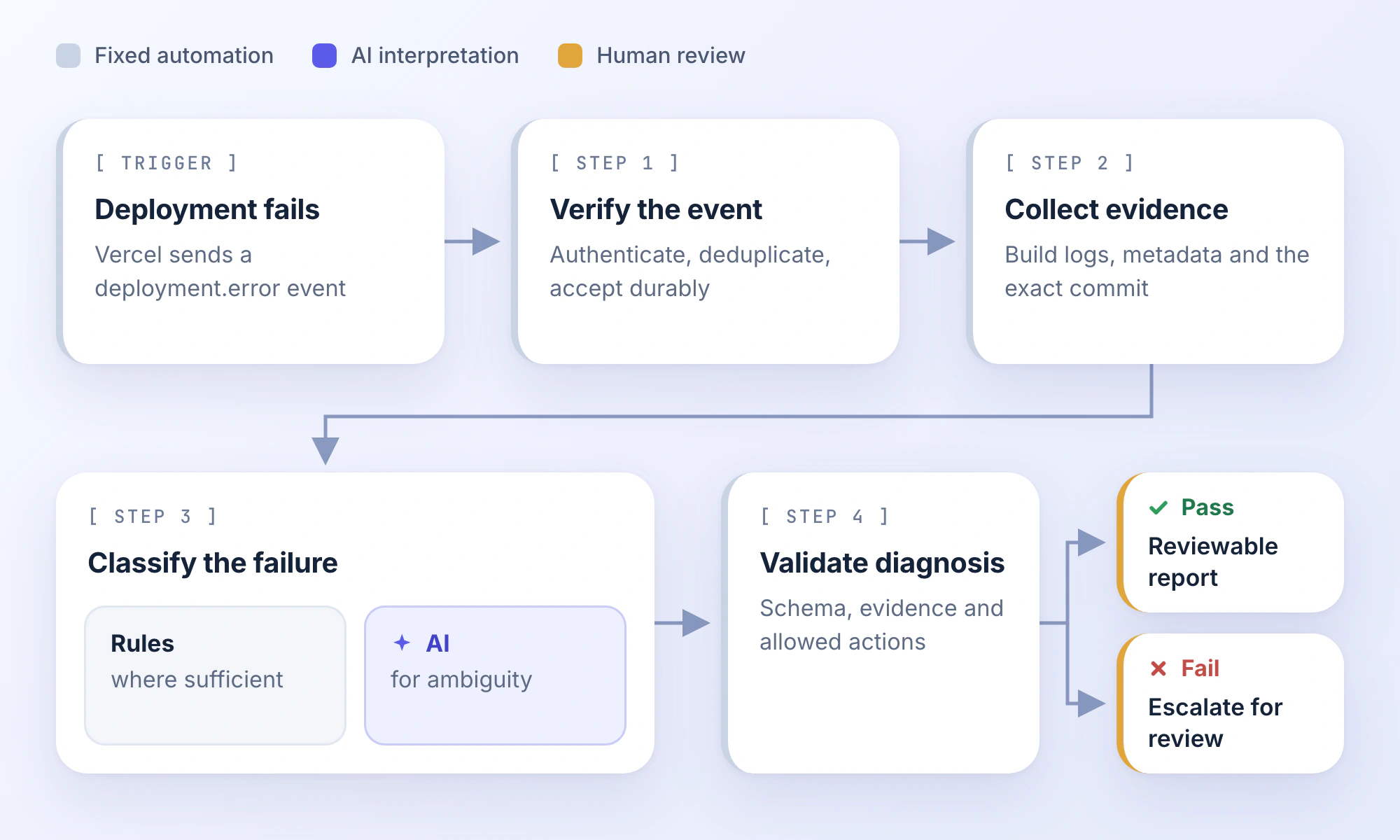
1. Receive the Event Without Blocking Execution
Vercel provides a deployment.error event when a deployment fails.
A simplified payload using fields from its webhook specification looks like this:
{
  "id": "evt_demo_01",
  "type": "deployment.error",
  "payload": {
    "deployment": {
      "id": "dpl_demo_01",
      "name": "web-app"
    },
    "project": {
      "id": "prj_demo_01"
    },
    "target": "production"
  }
}
The values are examples. An actual event may contain additional metadata.
The receiver should validate the request before accepting it. Vercel documents an x-vercel-signature header, verified against the raw request body using the configured webhook secret.
Don't treat an HTTP request as trustworthy merely because it contains a recognizable deployment ID.
After authentication, validate the event type and required identifiers. Then check whether the event has already been processed.
This is important because Vercel may retry webhook deliveries when an endpoint doesn't return a successful response.
The receiver also shouldn't run a lengthy AI investigation before acknowledging the webhook.
Vercel specifies a 30-second HTTP response timeout.
The safer execution pattern
Receive→Verify→Validate→Persist or enqueue→Acknowledge→Investigate asynchronously
A successful response should follow durable acceptance of the event, so a worker failure doesn't silently lose it.
For deduplication, store the delivery ID and an appropriate processing key, such as the project, deployment, and workflow version.
The delivery ID helps identify repeated deliveries. The processing key prevents duplicate triage reports for the same deployment while still allowing an explicit reprocessing request when needed.
2. Retrieve Evidence for the Exact Deployment
Once the event is accepted, the worker retrieves the information needed for analysis.
Vercel provides deployment details and build logs. Its official MCP integration also exposes a get_deployment_build_logs tool, which accepts a deployment ID or URL and relevant team information.
For repository context, retrieve the commit associated with the deployment and inspect the relevant changes through GitHub.
The most important detail is using the commit that actually produced the failed deployment.
Suppose the deployment used commit abc123, but the main branch has received several commits since then.
Inspecting the current branch could lead the model to associate the failure with changes that weren't present in the deployed build.
The investigation should therefore establish the deployment-to-commit relationship before making repository-based conclusions.
If that association cannot be verified, mark the repository context as unavailable rather than silently substituting the current branch.
A useful context package might contain:
| Source | Information |
|---|---|
| Deployment event | Deployment ID, project ID, environment, event timestamp |
| Build logs | Relevant error messages and surrounding lines |
| Repository | Verified commit SHA and relevant changed files |
| Build configuration | Runtime version, build command, dependency configuration |
| Previous processing state | Whether this deployment has already been investigated |
Avoid retrieving the entire repository or every historical build log by default.
Collect the evidence necessary for the current question, then expand the investigation if a specific uncertainty requires it.
Also account for incomplete data. Vercel's build-log documentation notes that build logs can be truncated when they exceed the platform's size limit.
If the important portion of the log is missing, the workflow should report incomplete evidence.
Before sharing logs with a model or another destination, filter secrets, tokens, personal data, and other sensitive values that may appear in diagnostic output.
3. Keep the First Classification Deterministic
Not every deployment failure needs AI interpretation.
Some errors have recognizable signatures:
- A build command exits because a required file doesn't exist.
- A dependency cannot be resolved.
- An explicit permission error prevents accessing a resource.
- A known configuration check fails.
A rules-based classifier can identify some of these cases or extract the relevant error segment.
That can reduce model calls and make common classifications easier to maintain.
However, don't assume that matching an error string always identifies the root cause.
A missing-module message could indicate an undeclared dependency, incorrect import path, case-sensitive filesystem difference, or an earlier installation failure.
The initial classification should identify an error category and preserve the evidence, not claim certainty about the underlying fix.
If the error isn't adequately explained by deterministic checks, send the curated context to an AI step.
4. Ask AI for a Constrained Diagnosis
An open-ended instruction such as "investigate and fix this deployment" combines diagnosis and execution.
For this workflow, that is unnecessary.
Instead, define the task around an evidence-backed report:
Analyze the supplied deployment failure context. Identify the most likely failure category, explain what the available evidence supports, and recommend the next verification steps. Reference only the supplied evidence IDs. Do not invent logs, commits, files, or configuration values. If the evidence is insufficient, return
needs_more_context. Do not propose that any action has already been executed.
Give the model a fixed output structure.
For example, imagine the collected context includes:
{
  "deployment_id": "dpl_demo_01",
  "commit_sha": "abc123",
  "evidence": [
    {
      "id": "log:42",
      "text": "Module not found: Can't resolve 'date-fns'"
    }
  ]
}
A suitable model response would be:
{
  "deployment_id": "dpl_demo_01",
  "status": "ready_for_review",
  "category": "dependency_resolution",
  "summary": "The build cannot resolve the date-fns module.",
  "evidence_ids": ["log:42"],
  "next_checks": [
    "Inspect the dependency declaration at commit abc123.",
    "Check the lockfile and installation output.",
    "Verify the import path and module resolution."
  ]
}
This output doesn't claim that the missing dependency is definitively the root cause.
It describes the observed failure and suggests targeted checks.
It also uses a reference to actual evidence instead of generating an unsupported explanation.
5. Validate the Report Outside the Model
Structured output improves consistency, but valid JSON isn't proof of a correct diagnosis.
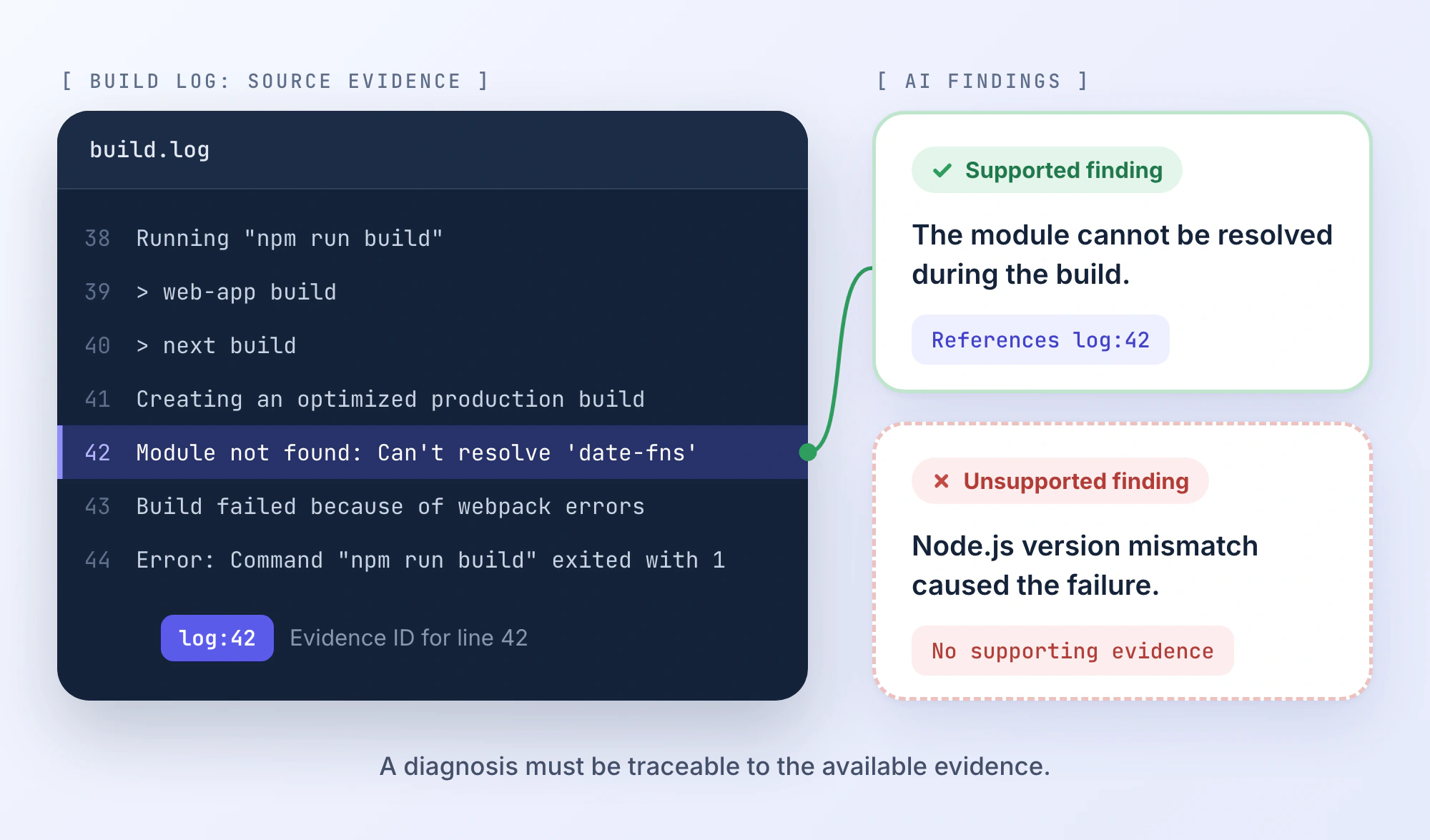
The report needs independent checks.
At minimum, validate that the deployment ID matches the original event, the failure category belongs to the allowed set, and referenced evidence IDs actually exist.
A small Python validation function could enforce those conditions:
ALLOWED_CATEGORIES = {
    "dependency_resolution",
    "build_configuration",
    "source_error",
    "environment_error",
    "unknown",
}

def validate_report(report, context):
    if report.get("deployment_id") != context["deployment_id"]:
        raise ValueError("Deployment ID mismatch")

    if report.get("status") not in {
        "ready_for_review",
        "needs_more_context",
    }:
        raise ValueError("Invalid report status")

    if report.get("category") not in ALLOWED_CATEGORIES:
        raise ValueError("Unknown failure category")

    valid_ids = {
        item["id"] for item in context["evidence"]
    }
    cited_ids = report.get("evidence_ids")

    if not isinstance(cited_ids, list):
        raise ValueError("Invalid evidence references")

    if not all(
        isinstance(item, str) and item in valid_ids
        for item in cited_ids
    ):
        raise ValueError("Unsupported evidence reference")

    if report["status"] == "ready_for_review" and not cited_ids:
        raise ValueError("Reviewable report needs evidence")

    return True
This function is executable for the illustrated data structures, but it's only one component of the validation layer.
It checks identifiers and output constraints. It does not establish that the referenced log lines actually support the model's conclusion.
That still requires additional evaluation or human review.
For a production implementation, use a formal output schema, constrain the model's tool access, and test recommendations against the workflow's permission policy.
6. Deliver Something the Developer Can Use
The final output should reduce the work required to continue the investigation.
A report might look like this:
- Deployment: web-app / dpl_demo_01
- Commit: abc123
- Failure category: Dependency resolution
- Observed error: Module not found: Can't resolve 'date-fns'
- Likely issue: The build environment cannot resolve the referenced module. The precise cause remains unverified.
- Evidence: Build log line 42.
- Recommended checks: Inspect the dependency declaration and lockfile at the deployed commit. Check whether package installation succeeded and whether the import path is valid.
- Actions taken: Logs and commit metadata collected; diagnosis prepared.
- Actions not taken: No code changes, configuration updates, or redeployment.
- Status: Ready for developer review.
The report should include links to the original deployment and repository evidence wherever available.
A developer can now inspect a targeted finding rather than start by navigating several disconnected systems.
Notice that we haven't automated the fix.
That's intentional. The first workflow is complete when it has delivered a useful, verifiable investigation.
A separate remediation workflow can later handle proposed patches, tests, and pull-request preparation under different permissions.
What Happens When the Workflow Gets It Wrong?
The successful example shows the intended path. Reliability comes from defining what happens when the path breaks.
Consider three situations using the same workflow.
Case 1: The Build Error Is Clear
The deployment logs contain a missing-module error. The deployment commit is verified, and the model references the exact error line.
The validation layer accepts the report.
The developer receives a diagnosis and relevant checks.
Outcome
Report generated successfully, pending developer confirmation.
This is the case automation should handle with minimal intervention.
Case 2: The Logs Aren't Available
The worker attempts to retrieve build logs, but the integration returns an authentication error.
There isn't enough evidence to diagnose the problem.
The correct response isn't to ask the model to infer what probably happened from the deployment name or commit message.
Instead, the workflow records the failed retrieval, marks the investigation as blocked, and alerts the owner to restore access.
Outcome
No diagnosis generated; integration failure recorded.
The workflow has failed to complete its task, but it has behaved correctly.
That distinction matters. A controlled failure is better than a confident, unsupported answer.
Case 3: The AI Diagnosis Sounds Plausible but Lacks Evidence
Suppose the model reports:
"The deployment failed because the Node.js version is incompatible."
However, the retrieved build output contains no version-related errors, and the context doesn't include a runtime version.
The explanation might be possible, but the evidence doesn't support it.
A schema validator may accept the JSON, so a separate evidence check or reviewer must catch the unsupported conclusion.
Outcome
Diagnosis rejected or marked for manual review.
This is why model output should be treated as a proposal for evaluation rather than an authoritative account of what happened.
Design for Failures Beyond the AI Step
Real workflows also encounter problems unrelated to reasoning quality.
| Failure | Required handling |
|---|---|
| Duplicate webhook delivery | Detect prior processing and avoid duplicate reports |
| Temporary API failure | Retry with bounded backoff |
| Expired credentials | Stop and request reauthorization |
| Incomplete logs | Identify missing evidence and limit conclusions |
| Unsupported AI diagnosis | Reject or escalate the result |
| Worker restart | Resume from persisted state or safely reprocess |
| Malicious instructions inside source data | Treat the content as untrusted and enforce permissions independently |
One especially important distinction concerns retries.
Repeating a read-only API request is generally straightforward. Repeating an operation that creates a GitHub issue, sends a notification, or updates a resource may produce duplicate side effects.
Use idempotent operations, stable identifiers, or compensating actions where necessary.
Another consideration is prompt injection. Build logs, issues, comments, and retrieved documents can contain instructions written by external parties.
An instruction embedded in a log telling the agent to upload credentials or execute a command is not a legitimate part of the workflow.
Permissions must be enforced by the execution environment, not solely by telling the model to ignore malicious instructions.
Running the Workflow Without Watching Every Step
Once the investigation produces useful reports, the next question is where it should execute.
Different environments provide different capabilities.
GitHub Actions is useful when work is closely tied to repository events, checks, and CI operations.
Visual orchestration tools such as n8n can connect services and route events through a defined sequence.
For long-running workflows that need persisted execution state, systems such as Temporal provide durable orchestration patterns.
An AI developer workstation is another option when the workflow needs to operate across local projects, development tools, agents, and connected services.
Where PandaOS Fits
PandaOS provides a local AI workstation with connected development tools and automations for recurring or event-driven work.
Its automation builder supports AI steps, connected-app actions, agents, conditional branches, and output destinations. Run history lets developers inspect individual executions.
For our deployment example, PandaOS documents a Vercel app-event trigger for completed deployments, with filtering for failed results.
That gives developers a way to start an investigation from a connected deployment service without necessarily building their own webhook receiver.
There is an important technical distinction, however.
Vercel's native webhook delivery and PandaOS's Vercel app-event trigger are different execution paths.
PandaOS's built-in app-event triggers poll connected services at configured intervals. An incoming webhook can trigger a separate automation through a generated endpoint.
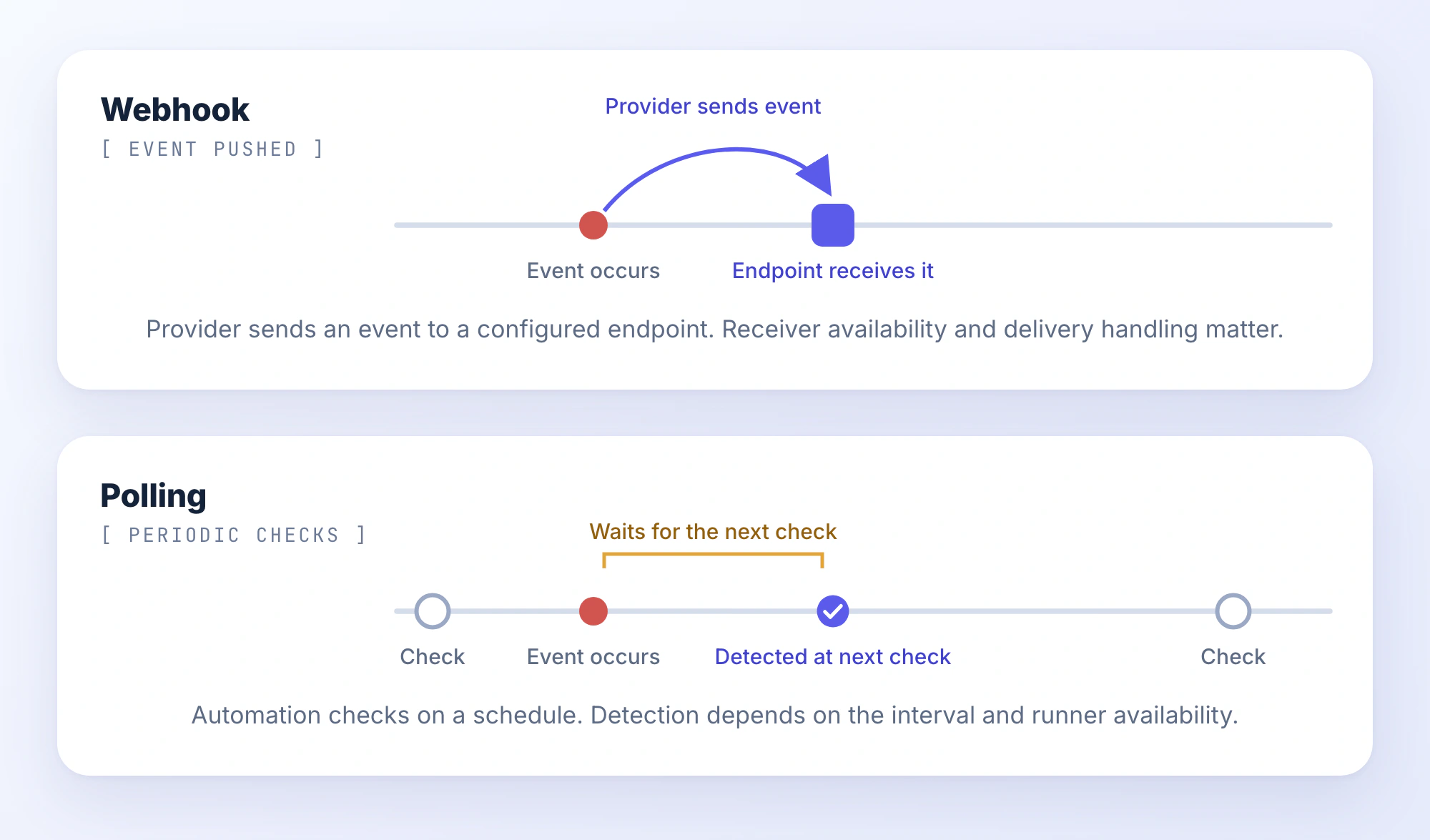
The choice affects latency, setup, and operational reliability.
Developers can use PandaOS to organize AI-assisted investigation steps around connected services, while keeping existing CI/CD and deployment systems responsible for their established jobs.
For specific integration configuration, the PandaOS Automations documentation provides the available triggers, nodes, and outputs.
Local-First Doesn't Mean Always Running
Because PandaOS operates locally, the host machine's state matters.
Its background service can continue running automations while the application window is closed, provided the service is active.
When the computer sleeps, execution stops. Missed scheduled runs follow the configured catch-up policy.
PandaOS also documents permission modes that restrict tool calls or pause actions for approval. An approval-paused run does not survive an application or service restart.
These limitations matter when deciding whether an automation should be local or hosted.
A personal daily report might tolerate waiting until the machine wakes up. A time-sensitive production incident workflow may require an always-available execution service.
The right setup depends on the required response time, recovery behavior, and access boundaries, not simply on which tool offers the most automation features.
For high-impact tasks, keep approval and execution permissions explicit. PandaOS's unattended-run documentation describes its permission rules and recovery behavior in more detail.
Is the Automation Actually Saving Engineering Time?
Completing a workflow isn't the same as improving engineering productivity.
Imagine the deployment triage automation runs successfully 100 times, but developers discard most reports because the diagnoses are weak.
The execution success rate looks impressive. The operational value does not.
The evaluation should return to the reason the workflow was built: reducing manual investigation while preserving useful outcomes.
Track a small set of measures.
| Metric | What it reveals |
|---|---|
| Human handling time | How much active investigation and review time remains |
| Accepted-output rate | How often the report is useful without substantial correction |
| Correction rate | How frequently developers must repair or replace the diagnosis |
| Escalation rate | How often the workflow cannot complete its intended task |
| Cost per accepted report | What useful automation outcomes cost to produce |
Start with a manual baseline.
Suppose developers spend an average of 15 minutes preparing comparable deployment reports.
After introducing automation, reviewing and acting on a report takes four minutes.
That suggests 11 minutes of human handling time saved per accepted case.
But the calculation must include failures and rework.
If reports often require a second investigation, the apparent saving disappears. If a workflow takes two minutes to execute but the developer still spends 15 minutes verifying its claims, it hasn't meaningfully improved the process.
Evaluate a representative set of cases, including difficult failures, not just straightforward examples.
The logs from the workflow itself should help identify where improvement is needed.
If most failures come from missing repository context, improve data collection.
If outputs are syntactically invalid, strengthen the schema and validation.
If reports repeatedly misinterpret the same error class, update the classification approach and regression tests.
Only increase model autonomy when a simpler correction doesn't solve the observed problem.
Keep Regression Tests for the Workflow Itself
Developer automations change over time. Models, prompts, integrations, and external APIs evolve.
Maintain representative test fixtures for successful investigations, duplicate events, missing data, expired credentials, and unsupported diagnoses.
Run them when changing prompts, models, workflow definitions, or permissions.
The output doesn't need to be word-for-word identical. It needs to satisfy the same correctness and safety requirements.
Version important workflow definitions and record which version produced each report so unexpected behavior can be investigated.
Turn One Reliable Workflow Into a Repeatable Practice
The useful part of developer workflow automation isn't making every development task autonomous.
It's removing repeated coordination while keeping engineering decisions observable and controllable.
For a first workflow, choose one process with a clear trigger and measurable output.
Write down its inputs, execution permissions, failure conditions, and definition of success. Automate predictable operations with deterministic logic, introduce AI only where interpretation is needed, and keep high-impact actions behind appropriate approval boundaries.
Before enabling unattended execution, test duplicate events, missing information, unavailable services, and incorrect AI responses.
Then compare the results against the manual process.
If the automation reliably produces something developers can verify and use, you've established a foundation worth extending.
If it doesn't, improve the specific failing step before adding complexity.
The result should be a development workflow that requires less repetitive effort without creating another system developers have to constantly debug.
FAQ
Do developer workflows need AI agents, or can they use regular LLM calls?
Many workflows work well with a single bounded LLM call surrounded by deterministic steps. An agent becomes useful when the task requires dynamically choosing tools or investigation paths. Start with the simpler architecture and introduce an agent only when the additional flexibility is justified.
Can one automated workflow operate across multiple repositories?
Yes, provided it has the necessary integrations and permissions. Keep project identifiers, credentials, deployment environments, and execution context separated. A workflow managing multiple repositories should never infer which repository to modify from an ambiguous project name.
Is MCP required for developer workflow automation?
No. Workflows can use APIs, SDKs, scripts, webhooks, or native integrations directly. Model Context Protocol provides a standardized way for compatible AI hosts to expose tools and resources, but it isn't a prerequisite for automation.
How can I test an AI workflow without modifying real projects?
Use recorded events, sanitized logs, synthetic failure cases, mock API responses, and read-only permissions. Replace write actions with test destinations or simulated responses. Validate the output and execution trace before enabling production integrations.
Who should own an automated workflow once it is running?
Assign an owner responsible for its configuration, credentials, execution failures, output quality, and updates. Include a clear escalation destination and a way to disable the workflow when it behaves unexpectedly. An automation without operational ownership can become another source of maintenance work.